

Tagged: header color, menu color, t3-header
-
AuthorPosts
-
pavit Moderator
pavit
- Join date:
- September 2007
- Posts:
- 15749
- Downloads:
- 199
- Uploads:
- 2274
- Thanks:
- 417
- Thanked:
- 4028 times in 3778 posts
January 14, 2017 at 9:31 pm #1002327Hello
I have not correctly understood your question , you want logo slogan text "Ömer Fatih SAYAN" to be white in default page ? and black in Blog page ?
 abdullah canipek
Friend
abdullah canipek
Friend
abdullah canipek
- Join date:
- November 2014
- Posts:
- 133
- Downloads:
- 32
- Uploads:
- 22
- Thanks:
- 52
- Thanked:
- 1 times in 1 posts
January 14, 2017 at 10:38 pm #1002329Yes actually i want to white in home page and black in blog page. Main menu is also the same issue 🙂
pavit
- Join date:
- September 2007
- Posts:
- 15749
- Downloads:
- 199
- Uploads:
- 2274
- Thanks:
- 417
- Thanked:
- 4028 times in 3778 posts
January 15, 2017 at 8:33 am #1002370Hi
Please share as private reply a temp super user account to your backend i will have a look at it and suggest a solution.
abdullah canipek
Friend
abdullah canipek
- Join date:
- November 2014
- Posts:
- 133
- Downloads:
- 32
- Uploads:
- 22
- Thanks:
- 52
- Thanked:
- 1 times in 1 posts
January 15, 2017 at 12:25 pm #1002391This reply has been marked as private.pavit
- Join date:
- September 2007
- Posts:
- 15749
- Downloads:
- 199
- Uploads:
- 2274
- Thanks:
- 417
- Thanked:
- 4028 times in 3778 posts
January 15, 2017 at 6:06 pm #1002412Hello
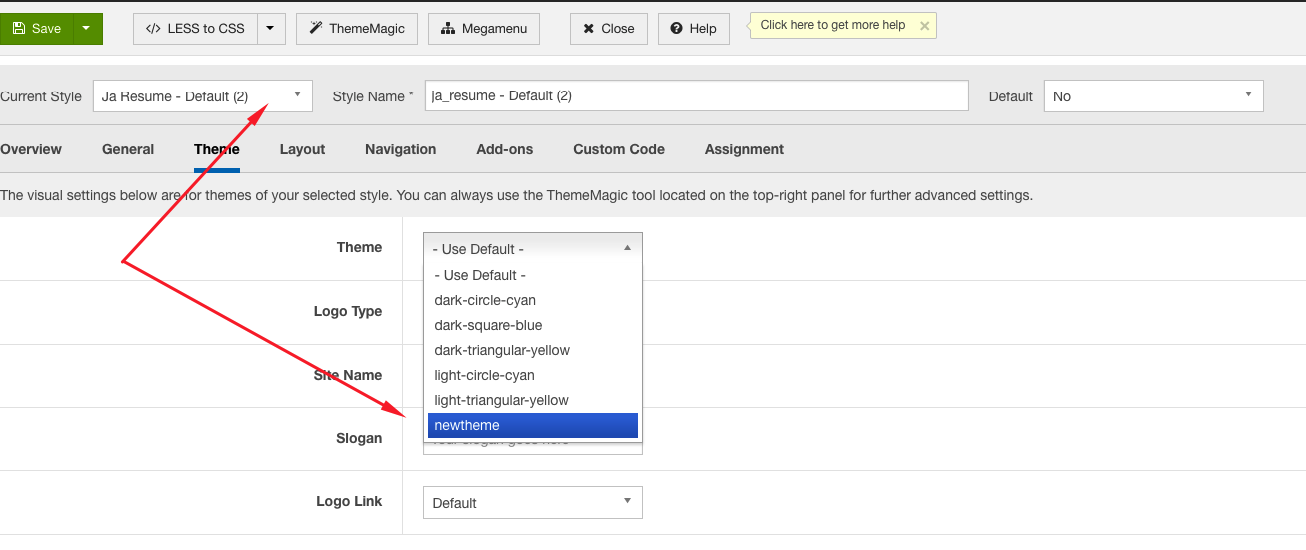
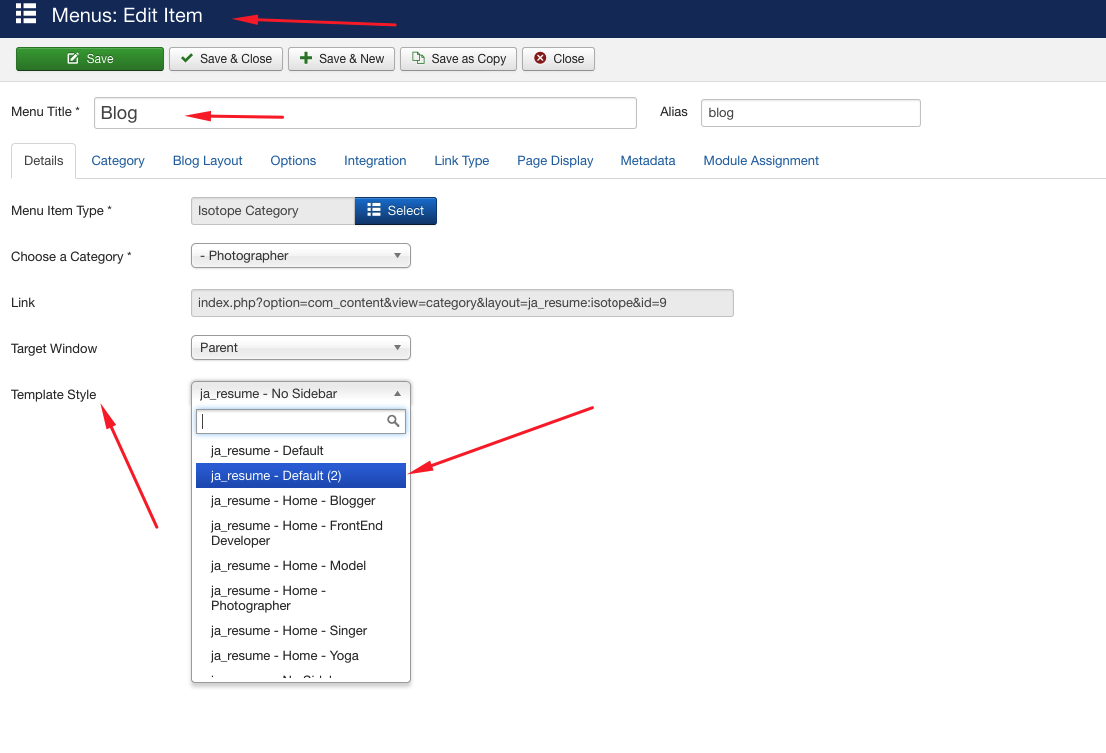
You can manage this creating a new theme with thememagic and then apply your new theme to the ja_resume – Home – Photographer template style ( only your home is using that template style )
Regards
abdullah canipek
Friend
abdullah canipek
- Join date:
- November 2014
- Posts:
- 133
- Downloads:
- 32
- Uploads:
- 22
- Thanks:
- 52
- Thanked:
- 1 times in 1 posts
January 16, 2017 at 7:27 am #1002556This reply has been marked as private.abdullah canipek
Friend
abdullah canipek
- Join date:
- November 2014
- Posts:
- 133
- Downloads:
- 32
- Uploads:
- 22
- Thanks:
- 52
- Thanked:
- 1 times in 1 posts
January 16, 2017 at 8:29 am #1002570I copy Ja Resume Defult style and open the theme magic,in the theme magic, logo color is when i assign blog page to new copy style then logo font is white frontend blog page 🙁
because both styles attribute come from the same template.css file. when i change .logo-text .site-slogan then home also change 🙁
I can not handle this problem ?
pavit
- Join date:
- September 2007
- Posts:
- 15749
- Downloads:
- 199
- Uploads:
- 2274
- Thanks:
- 417
- Thanked:
- 4028 times in 3778 posts
January 16, 2017 at 10:27 am #1002663Or did you change any other codes other than color and fonts style
I haven’t changed any code.
I can not handle this problem ?
If you create a new theme then assign the theme to the template layout and assign the template layout to a single menu item ( blog ) then that menu item will use template.css contained in theme folder at the url /templates/ja_resume/css/themes/yourtheme/template.css
Regards
abdullah canipek
Friend
abdullah canipek
- Join date:
- November 2014
- Posts:
- 133
- Downloads:
- 32
- Uploads:
- 22
- Thanks:
- 52
- Thanked:
- 1 times in 1 posts
January 16, 2017 at 12:41 pm #1002697If you create a new theme then assign the theme to the template layout
I dont understand create new theme and assign theme to template layout, i only copy _ jaresume – Default as ja_resume – Default (2) and assign the blog menu to this style.
Should i copy the whole template ? and then assign the single blog menu item ?
Best Regards.
pavit
- Join date:
- September 2007
- Posts:
- 15749
- Downloads:
- 199
- Uploads:
- 2274
- Thanks:
- 417
- Thanked:
- 4028 times in 3778 posts
January 16, 2017 at 1:00 pm #1002709Please follow steps showed in images below then edit your files in new local theme css folder.


1 user says Thank You to pavit for this useful post
abdullah canipek
Friend
abdullah canipek
- Join date:
- November 2014
- Posts:
- 133
- Downloads:
- 32
- Uploads:
- 22
- Thanks:
- 52
- Thanked:
- 1 times in 1 posts
January 16, 2017 at 1:38 pm #1002719Thanks a lot Pavit.
Great help 🙂
Regards.
AuthorPostsViewing 11 posts - 1 through 11 (of 11 total)This topic contains 11 replies, has 2 voices, and was last updated by
abdullah canipek 8 years ago.The topic ‘T3-Header and logo visibility problem’ is closed to new replies.
Jump to forum