-
AuthorPosts
-
innovationmindcenter Friend
innovationmindcenter
- Join date:
- December 2014
- Posts:
- 101
- Downloads:
- 184
- Uploads:
- 13
- Thanks:
- 21
- Thanked:
- 1 times in 1 posts
January 20, 2016 at 11:14 pm #863610Hi,
RSFiles icons do not display properly on JA Charity template.
Here is how this icons/component should be displayed:
http://worldgame.erickson.edu/index.php?option=com_rsfiles&template=protostarand here is how it looks like on Ja Charity template:
http://worldgame.erickson.edu/upload-files/briefcase?folder=301Here is a screen shot of the issue which icons are missing:

In addition, I have contacted RS support and they mentioned that this issue is about template and that I have to contact you.
Please help me to display this icons normally as it is on protostar.
I also tried to remove:.collapse {
display: none;
}
from: /templates/ja_charity/css/bootstrap.cssand also tried to I tried to change in following file: /t3-assets/dev/templates.ja_charity.less.bootstrap.less.css
.collapse {
display: none;
}Changed to :
.collapse {
display: block;
}but this did not help help.
I am send you ftp and admin access as well just in case with this message.
Please let me know what is the next step to solve this issue?
Thank you,
b Pankaj Sharma
Moderator
Pankaj Sharma
Moderator
Pankaj Sharma
- Join date:
- February 2015
- Posts:
- 24589
- Downloads:
- 144
- Uploads:
- 202
- Thanks:
- 127
- Thanked:
- 4196 times in 4019 posts
January 21, 2016 at 2:59 am #863928Hi
I checked the site url , But it needs a username and password to check the page .
Kindly submit temp. super user account details of your site via Private reply . So i can check this problem on your site .innovationmindcenter
- Join date:
- December 2014
- Posts:
- 101
- Downloads:
- 184
- Uploads:
- 13
- Thanks:
- 21
- Thanked:
- 1 times in 1 posts
January 21, 2016 at 8:22 am #864126This reply has been marked as private.Pankaj Sharma
Moderator
Pankaj Sharma
- Join date:
- February 2015
- Posts:
- 24589
- Downloads:
- 144
- Uploads:
- 202
- Thanks:
- 127
- Thanked:
- 4196 times in 4019 posts
January 21, 2016 at 9:02 am #864150Hi
I checked your site and its showing icon fine at my end : http://prntscr.com/9suj9linnovationmindcenter
- Join date:
- December 2014
- Posts:
- 101
- Downloads:
- 184
- Uploads:
- 13
- Thanks:
- 21
- Thanked:
- 1 times in 1 posts
January 26, 2016 at 11:57 am #868818I was able to fix that by removing following code from bootstrap.css
.collapse {
display: none;
}Unfortunately I am facing now another issue – mix with style!
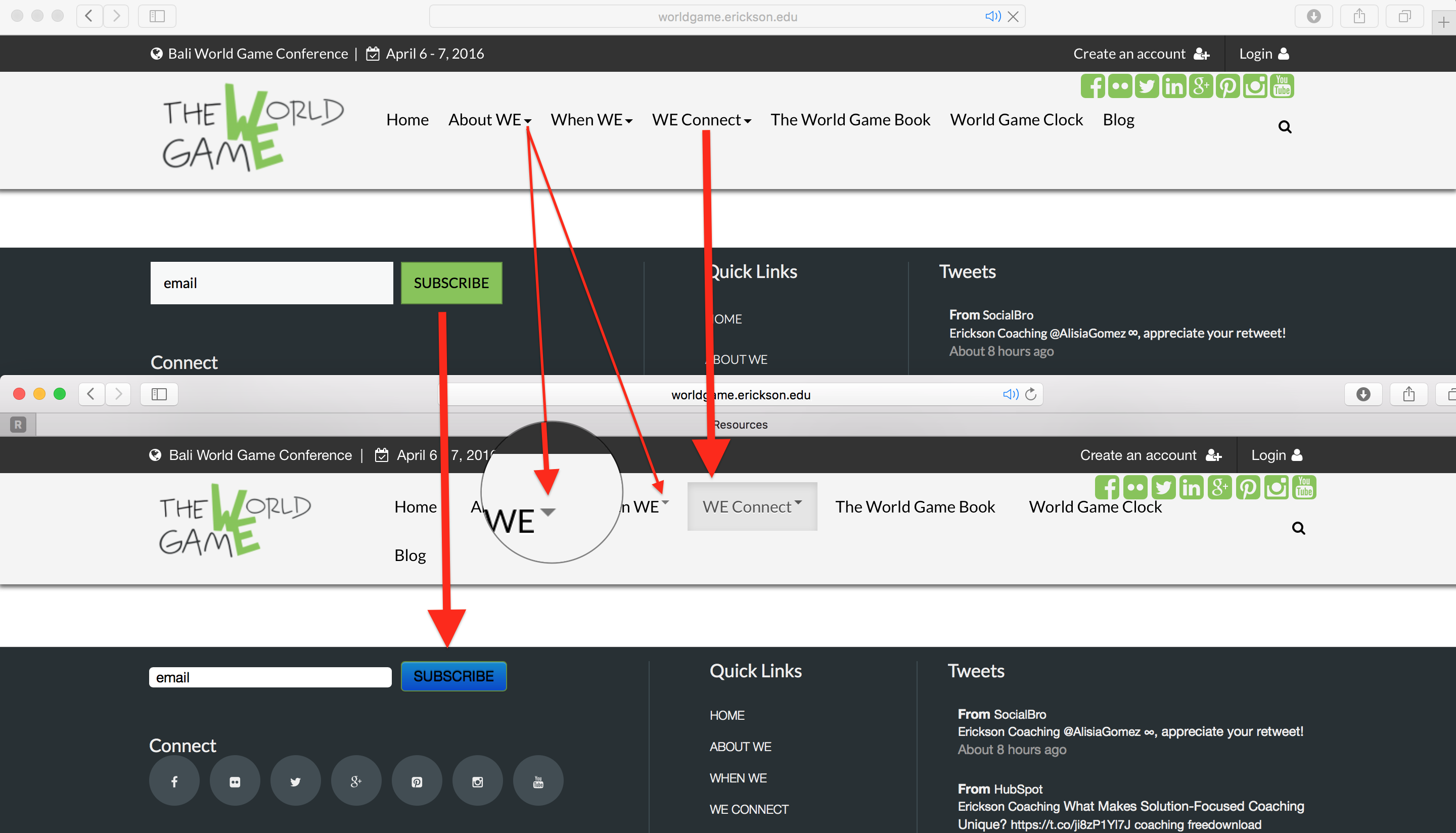
When this component is ON that page looks differently then other pages – style of buttons, menus do not looks good. Here is a screen shot below and here is an link of the issue: http://worldgame.erickson.edu/we-connect/resources how i can fix this?
Buttons do not match instead of green color it is blue color!
Menu tab is highlighted with gray color when is active – it should not be highlighted at all when it is active!
Drop down menu option do not work at all on that page! Pankaj Sharma
Moderator
Pankaj Sharma
Moderator
Pankaj Sharma
- Join date:
- February 2015
- Posts:
- 24589
- Downloads:
- 144
- Uploads:
- 202
- Thanks:
- 127
- Thanked:
- 4196 times in 4019 posts
January 26, 2016 at 3:27 pm #868975Hi
This might due to the extension use its own css that override these classes when same class name is there .
You can see it here : http://prntscr.com/9v2xd9
You need to override each class with adding !important
Like this in custom.css > http://prntscr.com/9v2y3p This is the reason its using default joomla bootstrap that has its own style.AuthorPostsViewing 6 posts - 1 through 6 (of 6 total)This topic contains 5 replies, has 2 voices, and was last updated by
Pankaj Sharma 9 years ago.We moved to new unified forum. Please post all new support queries in our New Forum
RSfiles icons do not display properly on JA Charity template
Viewing 6 posts - 1 through 6 (of 6 total)