-
AuthorPosts
-
iammontoya Friend
iammontoya
- Join date:
- June 2009
- Posts:
- 80
- Downloads:
- 38
- Uploads:
- 4
- Thanks:
- 9
- Thanked:
- 4 times in 3 posts
October 9, 2016 at 3:49 am #974658I have a client logo that is too big for its own box. How can I put the logo on its own line, and move the menu to the line below?
Thank you very much
pavit Moderator
pavit
- Join date:
- September 2007
- Posts:
- 15749
- Downloads:
- 199
- Uploads:
- 2274
- Thanks:
- 417
- Thanked:
- 4028 times in 3778 posts
October 9, 2016 at 5:32 am #974660Hi
Could you post a screenshot with an image describing how you want to change logo and mainnav position ?
iammontoya
- Join date:
- June 2009
- Posts:
- 80
- Downloads:
- 38
- Uploads:
- 4
- Thanks:
- 9
- Thanked:
- 4 times in 3 posts
October 9, 2016 at 6:24 pm #974740please see attached… im trying to get the blue part (logo) on 1st line, and the nav (red part) on a separate line. They have more menu items and the logo needs to be bigger, so I have to put them on separate lines.
pavit
- Join date:
- September 2007
- Posts:
- 15749
- Downloads:
- 199
- Uploads:
- 2274
- Thanks:
- 417
- Thanked:
- 4028 times in 3778 posts
October 9, 2016 at 7:36 pm #974765Hi
You can try adding a new position next to logo and leave it empty with a custom-html module
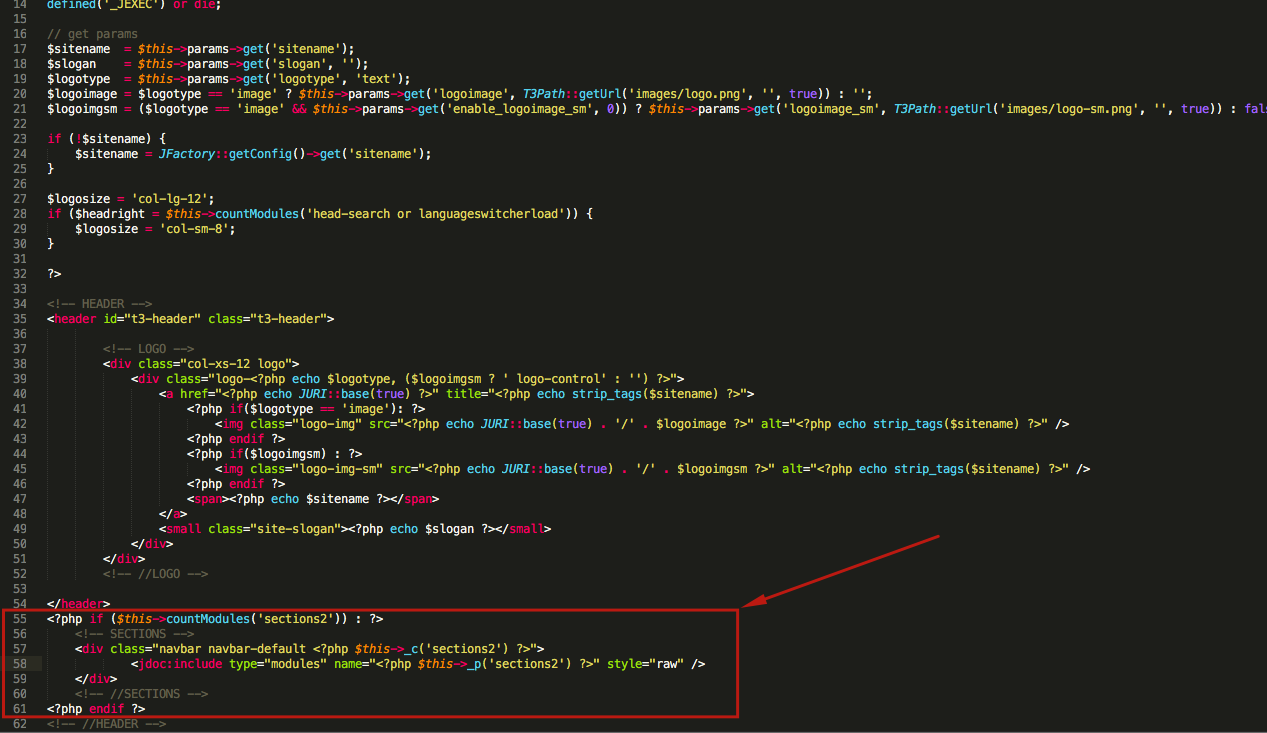
Open this file /templates/ja_platon/tpls/blocks/header.php and add below tag following code
<?php if ($this->countModules('sections2')) : ?>
    <!-- SECTIONS -->
    <div class="navbar navbar-default <?php $this->_c('sections2') ?>">
            <jdoc:include type="modules" name="<?php $this->_p('sections2') ?>" style="raw" />
    </div>
    <!-- //SECTIONS -->
<?php endif ?>
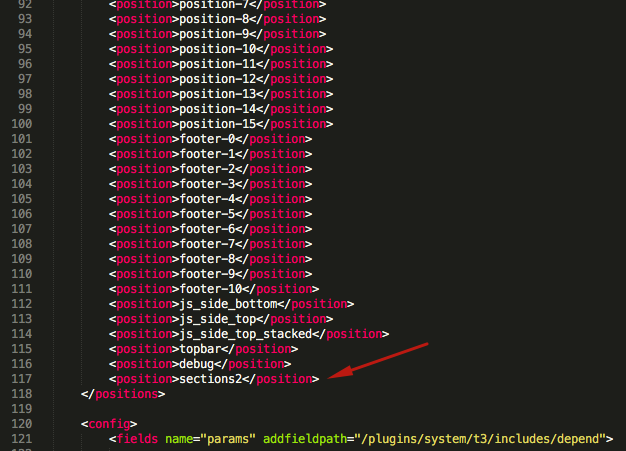
Then open this file /templates/ja_platon/templateDetails.xml and add sections2 position as showed in img below
Then create an empty custom-html module and publish it in position sections2

iammontoya
- Join date:
- June 2009
- Posts:
- 80
- Downloads:
- 38
- Uploads:
- 4
- Thanks:
- 9
- Thanked:
- 4 times in 3 posts
October 9, 2016 at 10:36 pm #974792thank you for the explanation. I did all you suggested, but nothing changed. I’ll keep looking at it in meantime.. gonna check dev tools
pavit
- Join date:
- September 2007
- Posts:
- 15749
- Downloads:
- 199
- Uploads:
- 2274
- Thanks:
- 417
- Thanked:
- 4028 times in 3778 posts
October 10, 2016 at 6:33 am #974919Hi
Could you share a temp super user account to your backend ? i will have a look at it
iammontoya
- Join date:
- June 2009
- Posts:
- 80
- Downloads:
- 38
- Uploads:
- 4
- Thanks:
- 9
- Thanked:
- 4 times in 3 posts
October 11, 2016 at 12:51 am #975150This reply has been marked as private.iammontoya
- Join date:
- June 2009
- Posts:
- 80
- Downloads:
- 38
- Uploads:
- 4
- Thanks:
- 9
- Thanked:
- 4 times in 3 posts
October 11, 2016 at 9:11 pm #975472any luck?
pavit
- Join date:
- September 2007
- Posts:
- 15749
- Downloads:
- 199
- Uploads:
- 2274
- Thanks:
- 417
- Thanked:
- 4028 times in 3778 posts
October 12, 2016 at 6:37 am #975569any luck?
Your code was added not in the correct way , i corrected it now
Check your home now
iammontoya
- Join date:
- June 2009
- Posts:
- 80
- Downloads:
- 38
- Uploads:
- 4
- Thanks:
- 9
- Thanked:
- 4 times in 3 posts
October 13, 2016 at 10:08 am #975978It’s close but it breaks when I go to the menu. For example, click on tutoring, and it goes back to what it was. How do I apply what you did to every single page?
My client is not very happy right now. I’m trying to make this work for them. Thank you very much!
pavit
- Join date:
- September 2007
- Posts:
- 15749
- Downloads:
- 199
- Uploads:
- 2274
- Thanks:
- 417
- Thanked:
- 4028 times in 3778 posts
October 13, 2016 at 10:19 am #975981Hi
Module spacer ( id 202) published in position sections2 should be assigned to all pages in assignments tab
I changed it for you now
AuthorPostsViewing 11 posts - 1 through 11 (of 11 total)This topic contains 10 replies, has 2 voices, and was last updated by
pavit 8 years, 3 months ago.
We moved to new unified forum. Please post all new support queries in our New Forum
Jump to forum
Putting logo on it\'s own line
Viewing 11 posts - 1 through 11 (of 11 total)