-
AuthorPosts
-
 TomC
Moderator
TomC
Moderator
TomC
- Join date:
- October 2014
- Posts:
- 14077
- Downloads:
- 58
- Uploads:
- 137
- Thanks:
- 948
- Thanked:
- 3155 times in 2495 posts
August 6, 2014 at 6:42 pm #544869The following tutorial may assist you in figuring out how/where to rearrange the blocks . . . .
http://www.joomlart.com/forums/topic/how-to-create-new-module-position-updated/
1 user says Thank You to TomC for this useful post
Nazario A Friend
Nazario A
- Join date:
- April 2013
- Posts:
- 1183
- Downloads:
- 0
- Uploads:
- 406
- Thanks:
- 91
- Thanked:
- 284 times in 263 posts
August 7, 2014 at 7:38 am #545007Please try my suggestion:
#1 – Create new file called “header-corporate.php” in folder: “/templates/your_template_name/tpls/blocks/ , then add this rule:
[PHP]<?php
/**
* @package T3 Blank
* @copyright Copyright (C) 2005 – 2012 Open Source Matters, Inc. All rights reserved.
* @license GNU General Public License version 2 or later; see LICENSE.txt
*/defined(‘_JEXEC’) or die;
// get params
$sitename = $this->params->get(‘sitename’);
$slogan = $this->params->get(‘slogan’, ”);
$logotype = $this->params->get(‘logotype’, ‘text’);
$logoimage = $logotype == ‘image’ ? $this->params->get(‘logoimage’, ‘templates/’ . T3_TEMPLATE . ‘/images/logo.png’) : ”;
$logoimgsm = ($logotype == ‘image’ && $this->params->get(‘enable_logoimage_sm’, 0)) ? $this->params->get(‘logoimage_sm’, ”) : false;if (!$sitename) {
$sitename = JFactory::getConfig()->get(‘sitename’);
}?>
<!– MAIN NAVIGATION –>
<header id=”t3-mainnav” class=”wrap navbar navbar-default navbar-fixed-top t3-mainnav”><div class=”header-image”>
<jdoc:include type=”modules” name=”header-image” style=”T3Xhtml” />
</div><!– OFF-CANVAS –>
<?php if ($this->getParam(‘addon_offcanvas_enable’)) : ?>
<?php $this->loadBlock (‘off-canvas’) ?>
<?php endif ?>
<!– //OFF-CANVAS –><div class=”container”>
<!– NAVBAR HEADER –>
<div class=”navbar-header”><!– LOGO –>
<div class=”logo logo-<?php echo $logotype ?>”>
<div class=”logo-<?php echo $logotype, ($logoimgsm ? ‘ logo-control’ : ”) ?>”>
<a href=”<?php echo JURI::base(true) ?>” title=”<?php echo strip_tags($sitename) ?>”>
<?php if($logotype == ‘image’): ?>
<img class=”logo-img” src=”<?php echo JURI::base(true) . ‘/’ . $logoimage ?>” alt=”<?php echo strip_tags($sitename) ?>” />
<?php endif ?><?php if($logoimgsm) : ?>
<img class=”logo-img-sm” src=”<?php echo JURI::base(true) . ‘/’ . $logoimgsm ?>” alt=”<?php echo strip_tags($sitename) ?>” />
<?php endif ?><span><?php echo $sitename ?></span>
</a>
</div>
</div>
<!– //LOGO –><?php if ($this->getParam(‘navigation_collapse_enable’, 1) && $this->getParam(‘responsive’, 1)) : ?>
<?php $this->addScript(T3_URL.’/js/nav-collapse.js’); ?>
<button type=”button” class=”navbar-toggle” data-toggle=”collapse” data-target=”.t3-navbar-collapse”>
<i class=”fa fa-bars”></i>
</button>
<?php endif ?><?php if ($this->countModules(‘head-search’)) : ?>
<!– HEAD SEARCH –>
<div class=”head-search<?php $this->_c(‘head-search’)?>”>
<jdoc:include type=”modules” name=”<?php $this->_p(‘head-search’) ?>” style=”raw” />
</div>
<!– //HEAD SEARCH –>
<?php endif ?></div>
<!– //NAVBAR HEADER –><!– NAVBAR MAIN –>
<?php if ($this->getParam(‘navigation_collapse_enable’)) : ?>
<nav class=”t3-navbar-collapse navbar-collapse collapse”></nav>
<?php endif ?><nav class=”t3-navbar navbar-collapse collapse”>
<jdoc:include type=”<?php echo $this->getParam(‘navigation_type’, ‘megamenu’) ?>” name=”<?php echo $this->getParam(‘mm_type’, ‘mainmenu’) ?>” />
</nav>
<!– //NAVBAR MAIN –></div>
</header>
<!– //MAIN NAVIGATION –><?php $this->loadBlock (‘masthead’) ?>[/PHP]
#2 – Open file: /templates/your_template_name/tpls/corporate.php then find and replace this code:
[PHP]<?php $this->loadBlock(‘header’) ?>[/PHP]With:
[PHP]<?php $this->loadBlock(‘header-corporate’) ?>[/PHP]#3 – Open file: /templates/your_template_name/tpls/blocks/header-corporate.php then add this rule:
<div class="header-image">

    	<jdoc:include type="modules" name="header-image" style="T3Xhtml" />

</div>
#4 – Open file: /templates/your_template_name/templateDetails.xml then add this line:
<position>header-image</position>#6 – Assign the Header Image module to header-image position.
#7 Open file: /templates/your_template_name/css/custom.css (if not exists, pls create new one) then add this rule:
.header-image .custom {

	text-align: center;

}

.off-canvas-toggle	{

	bottom: 0;

	top: auto;

}

.t3-wrapper.corporate{

	margin-top: 130px;

}
Here is result: http://prntscr.com/4ae246
Let me know if this helps
-
bokica Friend
bokica
- Join date:
- August 2014
- Posts:
- 6
- Downloads:
- 0
- Uploads:
- 7
- Thanks:
- 5
- Thanked:
- 1 times in 1 posts
August 7, 2014 at 12:38 pm #545046Thanks for response, but I can`t access that forum post because I am not premium user.
Saguaros Moderator
Saguaros
- Join date:
- September 2014
- Posts:
- 31405
- Downloads:
- 237
- Uploads:
- 471
- Thanks:
- 845
- Thanked:
- 5346 times in 4964 posts
bokica
- Join date:
- August 2014
- Posts:
- 6
- Downloads:
- 0
- Uploads:
- 7
- Thanks:
- 5
- Thanked:
- 1 times in 1 posts
bokica
- Join date:
- August 2014
- Posts:
- 6
- Downloads:
- 0
- Uploads:
- 7
- Thanks:
- 5
- Thanked:
- 1 times in 1 posts
August 7, 2014 at 4:35 pm #545079@nazario A ,
I applied your solution, but something went wrong. I followed your advices, but I noticed that step 5 is missing. Is that the reason?
This is how my web site http://www.leidsehijsbalken.nl/ looks right now: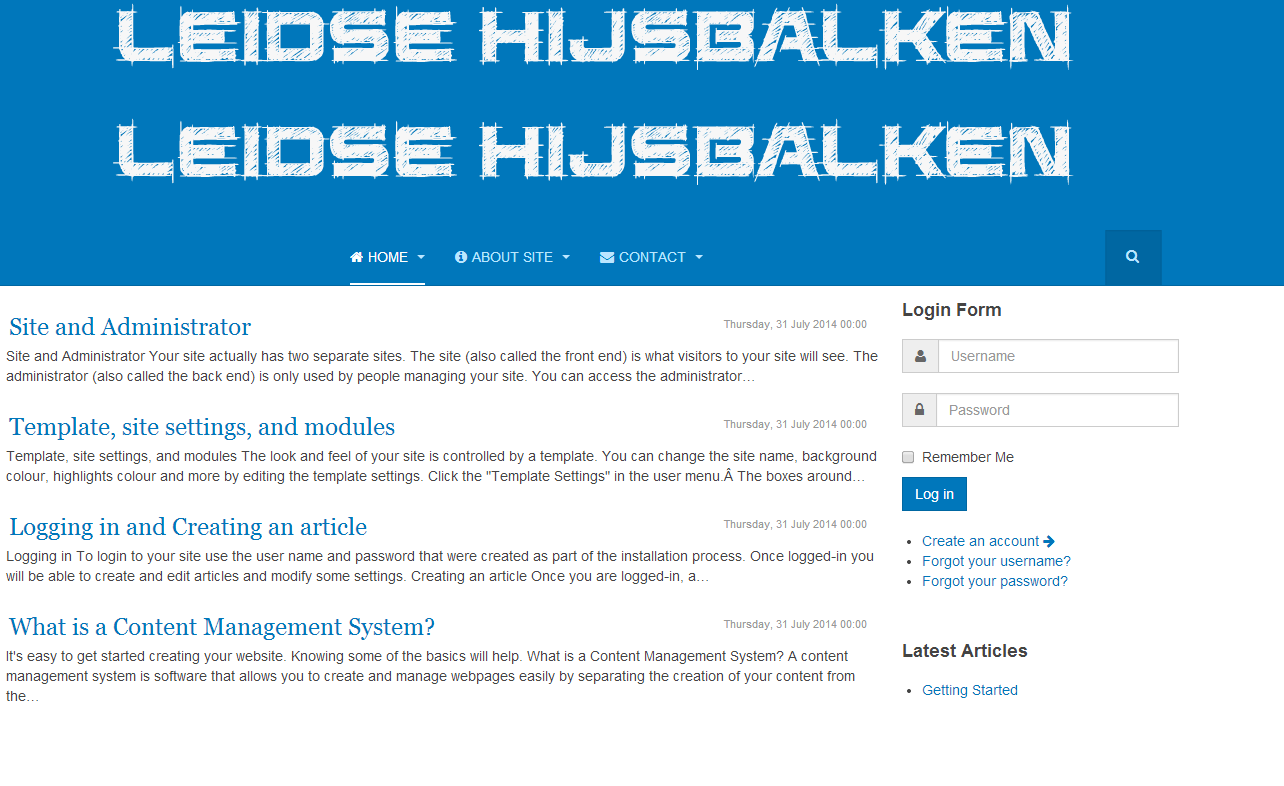

bokica
- Join date:
- August 2014
- Posts:
- 6
- Downloads:
- 0
- Uploads:
- 7
- Thanks:
- 5
- Thanked:
- 1 times in 1 posts
August 7, 2014 at 4:48 pm #545081I found this solution (editing CSS)
Nazario A
- Join date:
- April 2013
- Posts:
- 1183
- Downloads:
- 0
- Uploads:
- 406
- Thanks:
- 91
- Thanked:
- 284 times in 263 posts
August 8, 2014 at 1:35 am #545121Glad that you got it sorted at your end. Let me know if you need further help.
hdsports Friend
hdsports
- Join date:
- October 2014
- Posts:
- 27
- Downloads:
- 2
- Uploads:
- 4
- Thanks:
- 2
- Thanked:
- 2 times in 2 posts
November 6, 2014 at 11:05 am #554409Hey Nazaro, thanks for youf guidance
In 3) you have a little mistake:
I Think open
#3 – Open file: /templates/your_template_name/tpls/blocks/header-corporate.php then add this rule:means that open
header.php and not heade-corporate.php
And i have a question: Is there a way when i set on module header-image a picture, that when i scroll the site with the mouse down, that only the mainmenu stays on top-position and not the main-menu and the header-image?
 Ninja Lead
Moderator
Ninja Lead
Moderator
Ninja Lead
- Join date:
- November 2014
- Posts:
- 16064
- Downloads:
- 310
- Uploads:
- 2864
- Thanks:
- 341
- Thanked:
- 3854 times in 3563 posts
marian Friend
marian
- Join date:
- August 2007
- Posts:
- 24
- Downloads:
- 13
- Uploads:
- 1
- Thanks:
- 3
- Thanked:
- 1 times in 1 posts
November 14, 2014 at 11:51 am #555224Hi,
Thanks for this guide. Was useful but in my case I cannot to remove the background color from the new position with logo.
I need to have the background only on the navbar.
With this guide it seems that the new position is inside the navbar and take the css styles from the navbar.
Can you help me ? ThanksNinja Lead
Moderator
Ninja Lead
- Join date:
- November 2014
- Posts:
- 16064
- Downloads:
- 310
- Uploads:
- 2864
- Thanks:
- 341
- Thanked:
- 3854 times in 3563 posts
November 17, 2014 at 3:43 am #555347:(( @marian: Because the header of your site has been customized so it’s hard for me to suggest the solution without clue.
About the add new position in navbar, You can also check the video tutorial of layout customization here: http://www.youtube.com/watch?v=D6b1JDZDCQw
This video has a section that will guide you how to add new module position.marian
- Join date:
- August 2007
- Posts:
- 24
- Downloads:
- 13
- Uploads:
- 1
- Thanks:
- 3
- Thanked:
- 1 times in 1 posts
November 20, 2014 at 11:00 am #555932No, I don’t changed anything, the screnshot is from a new installation of a purity III (quickstart package). From this starting point I need to do those changes. But I think I found the solution. Let me knot if is correct:
1. create a new file named top.php into blocks folder with this code:
[PHP]<?php if ($this->checkSpotlight(‘top-pos’, ‘top-1, top2-2, top-3, top-4’)) : ?>
<!– TOP –>
<div class=”wrap t3-sl t3-sl-1″>
<div class=”container”>
<?php $this->spotlight(‘top-pos’, ‘top-1, top-2, top-3, top-4’) ?>
</div>
</div>
<!– //TOP –>
<?php endif ?><div class=”container”>
<div class=”header-image”>
<jdoc:include type=”modules” name=”top-pos” style=”T3Xhtml” />
</div>
</div>[/PHP]2. Open corporate.php and changed this code:
[PHP]<?php $this->loadBlock(‘header-corporate’) ?>[/PHP]
with this one:
[PHP]<?php $this->loadBlock(‘top’) ?>
<?php $this->loadBlock(‘header’) ?>[/PHP]3. open templateDetails.xml and add the new position:
[PHP]<position>top-pos</position>[/PHP]I think this is all that I’ve done.
hdsports
- Join date:
- October 2014
- Posts:
- 27
- Downloads:
- 2
- Uploads:
- 4
- Thanks:
- 2
- Thanked:
- 2 times in 2 posts
November 20, 2014 at 7:31 pm #555996<em>@Ninja Lead 452087 wrote:</em><blockquote>@hdsports: Your question is about customization and right now its difficult to guess the issue and give solution to you. You need to send me the screenshot and URL of your with what you are trying to achieve. I will help you to check it further</blockquote>
Hey, sorry for my late response
My site is: http://www.HDsports.at
Actually you see on my site on the top the menu.now i want over the menu an other block. its easy to realize that, with the example from “Nazaro A” in this thread.
BUT the new block over the top-menu should not stay on the top of the site when i scroll down with my mouse, only the top-menu should stay every time on the top of the site.
Is there a way to realize that?
1 user says Thank You to hdsports for this useful post
Ninja Lead
Moderator
Ninja Lead
- Join date:
- November 2014
- Posts:
- 16064
- Downloads:
- 310
- Uploads:
- 2864
- Thanks:
- 341
- Thanked:
- 3854 times in 3563 posts
November 21, 2014 at 3:46 am #556040@hdsports: I could not see the header-image module on your site but You can disable it when you scroll down on your site with my solution below
Open templates/purity_iii/js/script.js file and add script below inside
(function($){

	$(window).on ('scroll', function (e){

		var st = $(this).scrollTop();

		if (st < 1) {

			$(".header-image").css("display","block");

		}

		else {

			$(".header-image").css("display","none");

		}

	});

})(jQuery);
AuthorPostsThis topic contains 18 replies, has 8 voices, and was last updated by
Ninja Lead 9 years, 1 month ago.The topic ‘Purity III New Module Position – above the navigation menu’ is closed to new replies.
Jump to forum
melih




