

-
AuthorPosts
-
sebbs Friend
sebbs
- Join date:
- February 2006
- Posts:
- 529
- Downloads:
- 0
- Uploads:
- 62
- Thanks:
- 164
- Thanked:
- 6 times in 2 posts
April 8, 2014 at 7:40 pm #196575Hi there, site: http://baico.dev.dnsnetworks.ca/
Would it be possible to make the menu (top black and blue banner) always stay visible when the user scrolls down?newsun11026 Friend
newsun11026
- Join date:
- May 2012
- Posts:
- 62
- Downloads:
- 14
- Uploads:
- 7
- Thanks:
- 6
- Thanked:
- 19 times in 13 posts
sebbs
- Join date:
- February 2006
- Posts:
- 529
- Downloads:
- 0
- Uploads:
- 62
- Thanks:
- 164
- Thanked:
- 6 times in 2 posts
April 9, 2014 at 7:25 pm #530177I add what the documention suggested … in my header.php file…. therefor it looked like:
<!– MAIN NAVIGATION –>
<nav id=”t3-mainnav” class=”col-xs-12 col-md-9 t3-mainnav navbar navbar-default hidden-sm navbar-collapse-fixed-top navbar-fixed-top “>but it definitely didn’t work ..
looked like :
Anyone know what I did wrong?
 TomC
Moderator
TomC
Moderator
TomC
- Join date:
- October 2014
- Posts:
- 14077
- Downloads:
- 58
- Uploads:
- 137
- Thanks:
- 948
- Thanked:
- 3155 times in 2495 posts
April 9, 2014 at 7:29 pm #530179Did/Do you have a “mainnav.php” file? I think this is where the instructions indicated the modification should be.
Sticky main menu[/h]
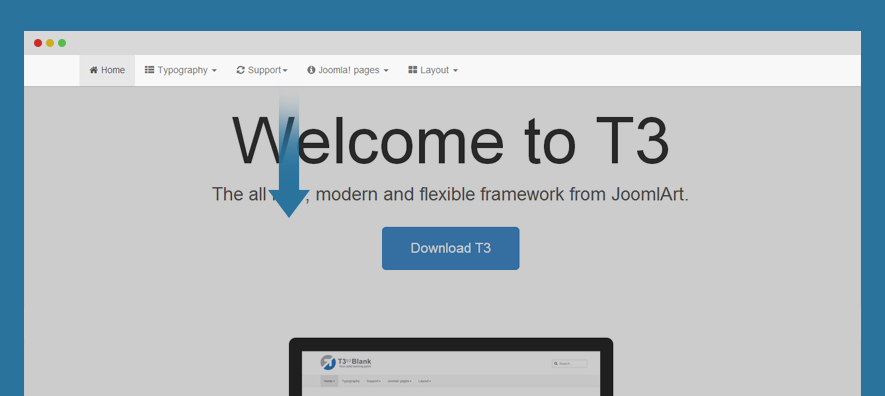
Sticky main menu, also known as fixed menu is basically a website menu that is locked into place so that it does not disappear when the user scrolls down the page; in other words, it is accessible from anywhere on the website without having to scroll.
Steps to make main menu sticky:
#1: upgrade T3 Framework plugin[/h] This feature can only operated with T3 Framework version 1.2.1, so you have to upgrade to the version. Check out upgrade documentation.
#2: add class to sticky menu[/h] You can select to make menu sticky on desktop layout or small screens or both.
To sticky menu, add class navbar-collapse-fixed-top (for collapse menu like mobile and tablet) and navbar-fixed-top (for desktop) to #t3-mainnav div (in the file: mainnav.php located in: templatesja_merotplsblocks). You may need update the margin-left & margin-right for the mainnav div
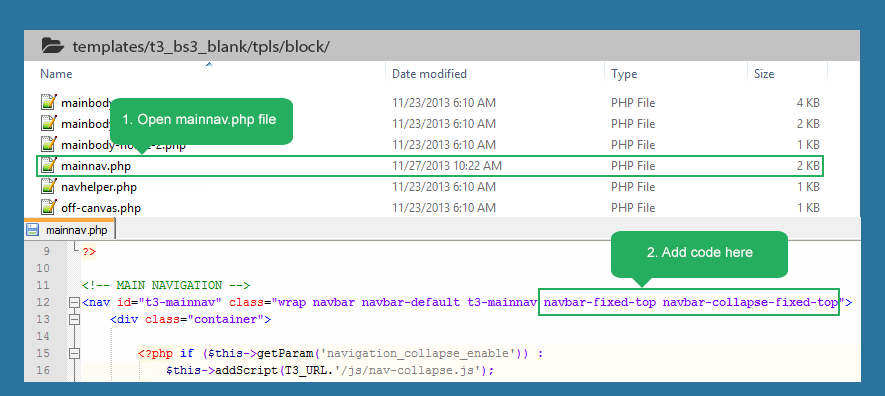
- <nav id=”t3-mainnav” class=”wrap navbar navbar-default t3-mainnav navbar-fixed-top navbar-collapse-fixed-top”>
1 user says Thank You to TomC for this useful post
sebbs
- Join date:
- February 2006
- Posts:
- 529
- Downloads:
- 0
- Uploads:
- 62
- Thanks:
- 164
- Thanked:
- 6 times in 2 posts
April 9, 2014 at 7:32 pm #530181I don’t have that file, so that’s why I figured I should put it in my header.php file… it has main nav code in the file…
<!– MAIN NAVIGATION –>
<nav id=”t3-mainnav” class=”col-xs-12 col-md-9 t3-mainnav navbar navbar-default hidden-sm”><!– Brand and toggle get grouped for better mobile display –>
<div class=”navbar-header”>Nazario A Friend
Nazario A
- Join date:
- April 2013
- Posts:
- 1183
- Downloads:
- 0
- Uploads:
- 406
- Thanks:
- 91
- Thanked:
- 284 times in 263 posts
April 10, 2014 at 10:24 am #530313@ sebbs,
Here is the solution for you.
1 user says Thank You to Nazario A for this useful post
sebbs
- Join date:
- February 2006
- Posts:
- 529
- Downloads:
- 0
- Uploads:
- 62
- Thanks:
- 164
- Thanked:
- 6 times in 2 posts
April 10, 2014 at 8:02 pm #530414I added a question for you in this thread
TomC
Moderator
TomC
- Join date:
- October 2014
- Posts:
- 14077
- Downloads:
- 58
- Uploads:
- 137
- Thanks:
- 948
- Thanked:
- 3155 times in 2495 posts
April 10, 2014 at 8:06 pm #530416<em>@sebbs 421099 wrote:</em><blockquote>I added a question for you in this thread</blockquote>
Which/What element(s) are you seeing as being “off?”
AuthorPostsViewing 8 posts - 1 through 8 (of 8 total)This topic contains 8 replies, has 4 voices, and was last updated by
TomC 10 years, 10 months ago.We moved to new unified forum. Please post all new support queries in our New Forum
Main menu to stay when scrolling down
Viewing 8 posts - 1 through 8 (of 8 total)
