-
AuthorPosts
-
valahia.university Friend
valahia.university
- Join date:
- October 2016
- Posts:
- 27
- Downloads:
- 56
- Uploads:
- 8
- Thanked:
- 1 times in 1 posts
March 16, 2017 at 8:10 pm #1019181After the RC failure I expected the commercial release hoping that will be a change.
There is no change.Same CSS issues.
Same JS issues.
Same lack of different jub/assets items.
Same blunder Published page.Same old, same old.
I am patient, I shall wait the next main update. The release is not working.
(I must confess it became a little bit frustrating).Please provide me the complete info about modules, plugins, even external resources needed to be installed in order to work.
Only the installation of the JA Builder commercial over the Joomla 3.6.5 stable is NOT working.P.S. Please don’t ask for credential to login on my site. I already give you in the RC phase and no one has ever being logged in.
And please put this forum on JA Builder page in order for us to be able to select that we are Developer and Premium accounts when post and to take advantage of this on your support!valahia.university
- Join date:
- October 2016
- Posts:
- 27
- Downloads:
- 56
- Uploads:
- 8
- Thanked:
- 1 times in 1 posts
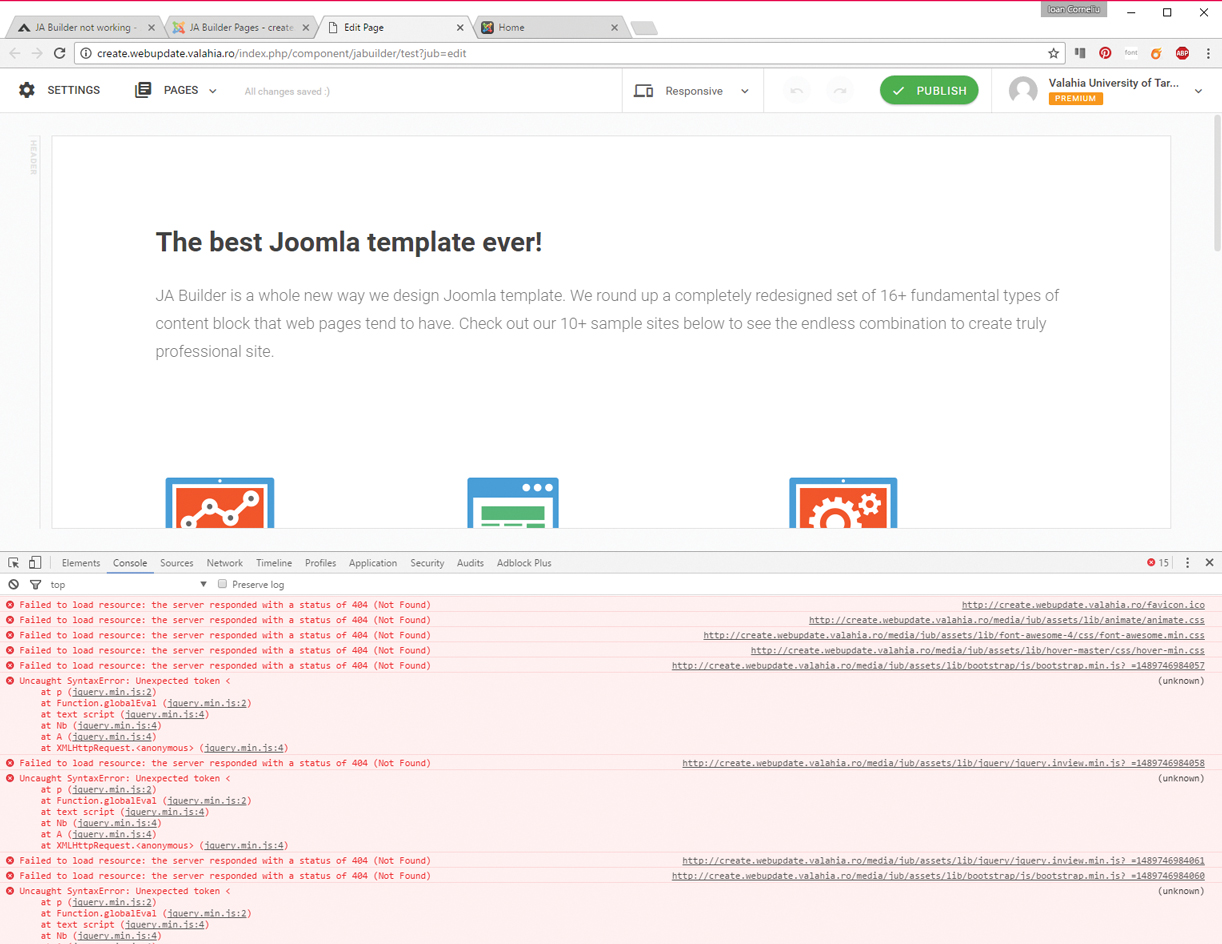
March 16, 2017 at 8:28 pm #1019183At first, there are errors related to bootstrap and jquery.
They must be installed before the Builder?valahia.university
- Join date:
- October 2016
- Posts:
- 27
- Downloads:
- 56
- Uploads:
- 8
- Thanked:
- 1 times in 1 posts
March 16, 2017 at 8:45 pm #1019191Fatal error: Call to a member function get() on null in templates/ja_builder/index.php on line 10
Saguaros Moderator
Saguaros
- Join date:
- September 2014
- Posts:
- 31405
- Downloads:
- 237
- Uploads:
- 471
- Thanks:
- 845
- Thanked:
- 5346 times in 4964 posts
March 17, 2017 at 7:28 am #1019381Hi,
It’s weird as all above issues have been fixed in previous version already. Kindly log into backend of your site > Extensions > Manage > Filter for Builder and check which version of JA Builder you’re using, some other guys still use the old version of JA Builder package and its plugin and experience some weird issues.
If you’re also using old ones, pls backup your site first, then go to Download section of JA Builder and get the stable version package, then install this package via Backend > Extensions > Install
Once done, clear browser’s cache & cookies then try to edit on your page as you wish. And inform us the result.
Regards
valahia.university
- Join date:
- October 2016
- Posts:
- 27
- Downloads:
- 56
- Uploads:
- 8
- Thanked:
- 1 times in 1 posts
March 17, 2017 at 11:31 am #1019463Dear Saguaros,
Here are the steps I’ve done:
- Erase entire site
- Erase database
- Install Joomla 3.6.5
- Install Plugin JA Builder (commercial not RC)
- Clean browser cache from the beginning
- NOT working.
Here are the symptoms:
- The page in the back-end not working (since there is no jub/ directory and of course no bootstrap path to bootstrap.min.js or jquery.inview to jquery.inview.min.js (1.jpg attached)
- After manual install of invew and bootstrap I was able to edit pages in back-end and all works well
- When try to publish PHP spit an error:
Fatal error: Call to a member function get() on null in templates/ja_builder/index.php on line 10
It seems like the pageclass_sfx has no value and get() function generate the error.
Any ideea?
Anyway, only installing the JA Builder package on a new, fresh system seems not working. I guess you tested it on an environment where you already have the resources required for the back-end and the front-end to work.
Please consider my intervention and ask one colleague from development to analyse this.Regards.
carlfarring Friend
carlfarring
- Join date:
- June 2012
- Posts:
- 35
- Downloads:
- 84
- Uploads:
- 0
- Thanked:
- 1 times in 1 posts
March 17, 2017 at 2:49 pm #1019504I took the exact same steps and had the exact same results. It is not just you. Just an fyi
carlfarring
- Join date:
- June 2012
- Posts:
- 35
- Downloads:
- 84
- Uploads:
- 0
- Thanked:
- 1 times in 1 posts
March 17, 2017 at 2:50 pm #1019506I did correct the error on line 10 by simply creating a menu link to the home page in the back end.
March 17, 2017 at 3:19 pm #1019516Here the same. I did a fresh install of Joomla 3.6.5 and JA Builder Commerical 1.0
If i try to "live edit" i get this "0 – Call to a member function get() on null".
We use PHP7 on our ServerRegards
valahia.university
- Join date:
- October 2016
- Posts:
- 27
- Downloads:
- 56
- Uploads:
- 8
- Thanked:
- 1 times in 1 posts
March 17, 2017 at 4:19 pm #1019536Hi carlfarring,
Hi schickmair,It looks like pageclass_sfx is uninitialized and have the null value. But this is a bug and they have to solve it in a commercial version.
What about bootstrap and jquery.inveiw? You also install them by hand?
Because this is not a solution until JA representative put this step in the install docs.
After publishing you have the same blunder aspect?(After publishing it cant find animation.css, I guess you have to install mod_jaanimation!?)
Anyway, I expect from JA to give us a concrete step by step install documentation. Because what they put in the demo movie is not enough for sure.Regards
Saguaros
- Join date:
- September 2014
- Posts:
- 31405
- Downloads:
- 237
- Uploads:
- 471
- Thanks:
- 845
- Thanked:
- 5346 times in 4964 posts
March 20, 2017 at 7:12 am #1020058Hi,
We’re also aware of that error in ‘index.php’ file, the team is already fixed it and the new version 1.0.1 will be released pretty soon (maybe today) with bug fixes and new features.
We’re sorry for any inconvenience it may cause, pls stay tuned.
Regards
AuthorPostsViewing 10 posts - 1 through 10 (of 10 total)This topic contains 9 replies, has 4 voices, and was last updated by
Saguaros 7 years, 10 months ago.
We moved to new unified forum. Please post all new support queries in our New Forum
JA Builder not working
Viewing 10 posts - 1 through 10 (of 10 total)