Tagged: JA BUILDER
-
AuthorPosts
-
ximware Friend
ximware
- Join date:
- December 2008
- Posts:
- 7
- Downloads:
- 70
- Uploads:
- 4
- Thanks:
- 1
- Thanked:
- 4 times in 1 posts
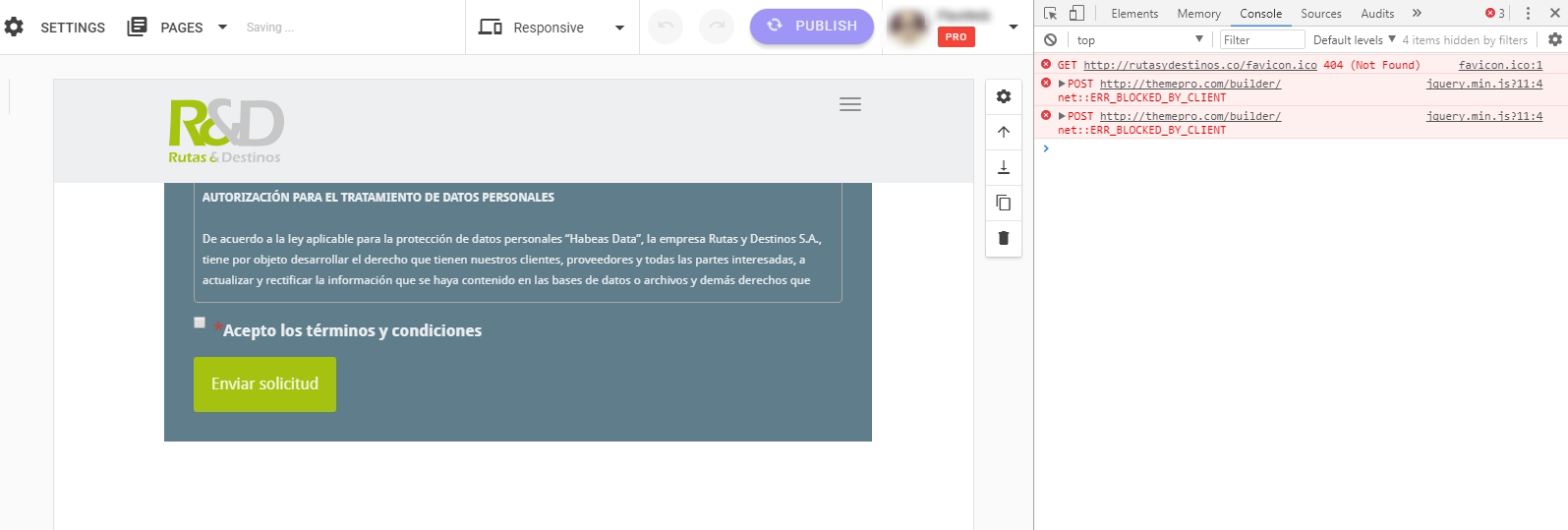
October 25, 2017 at 9:17 pm #1070084When I try to edit any page using JA Builder, AdBlock has blocked themepro.com/builder URI. The specific error is:
POST http://themepro.com/builder/ net::ERR_BLOCKED_BY_CLIENT – jquery.min.js?11:4
How to fix? I have added http://themepro.com/* into the AdBlock whitelist but doesn’t works. Just works when AdBlock is paused.
 Pankaj Sharma
Moderator
Pankaj Sharma
Moderator
Pankaj Sharma
- Join date:
- February 2015
- Posts:
- 24589
- Downloads:
- 144
- Uploads:
- 202
- Thanks:
- 127
- Thanked:
- 4196 times in 4019 posts
October 26, 2017 at 2:38 am #1070141Hi
You have to disable adblocker so site can load script fine.
You can use do not run ad blocker on this domain or page option http://prntscr.com/h23pm1Regards
ximware
- Join date:
- December 2008
- Posts:
- 7
- Downloads:
- 70
- Uploads:
- 4
- Thanks:
- 1
- Thanked:
- 4 times in 1 posts
October 26, 2017 at 7:18 pm #1070341It’s not logic! AdBlocker is a essential for navigation. I think that JA Page Builder should fix this incompatibility with AdBlocker. Disable AdBlocker it’s no a solution completely.
Regards.
Pankaj Sharma
Moderator
Pankaj Sharma
- Join date:
- February 2015
- Posts:
- 24589
- Downloads:
- 144
- Uploads:
- 202
- Thanks:
- 127
- Thanked:
- 4196 times in 4019 posts
October 27, 2017 at 1:15 am #1070371Hi
It’s not a problem of the builder, as the blocker on your site, does not allow the scripts to load.
You have to disable it or allow pause the blocker for builder pages.
I understand you want adblocker to not detect builder script but this is something that is controlled by the extension.Regards
AuthorPostsViewing 4 posts - 1 through 4 (of 4 total)This topic contains 3 replies, has 2 voices, and was last updated by
Pankaj Sharma 7 years, 3 months ago.We moved to new unified forum. Please post all new support queries in our New Forum