Viewing 7 posts - 1 through 7 (of 7 total)
-
AuthorPosts
-
pavit Moderator
pavit
- Join date:
- September 2007
- Posts:
- 15749
- Downloads:
- 199
- Uploads:
- 2274
- Thanks:
- 417
- Thanked:
- 4028 times in 3778 posts
December 17, 2015 at 6:50 pm #819082Hi
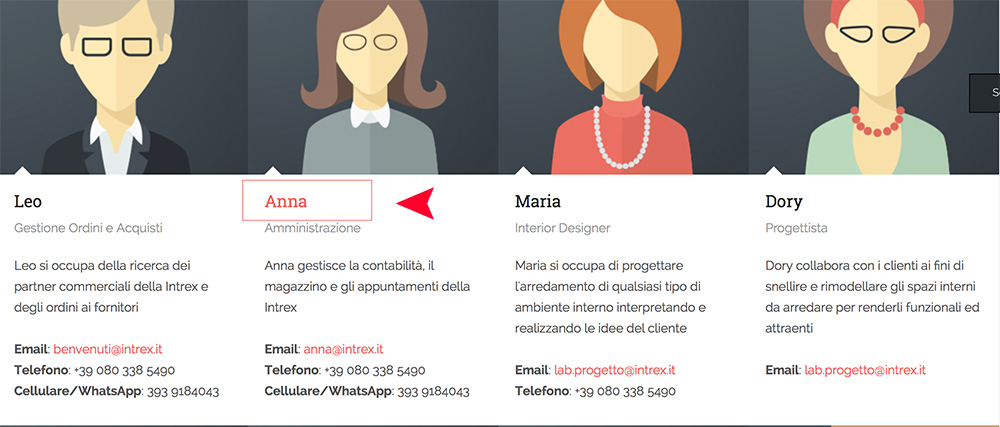
I attach an image.
There is no image attached in this topic
Could you please try again ?
December 23, 2015 at 4:51 pm #830065Sorry,
here you are the image attachedThank you
pavit
- Join date:
- September 2007
- Posts:
- 15749
- Downloads:
- 199
- Uploads:
- 2274
- Thanks:
- 417
- Thanked:
- 4028 times in 3778 posts
December 23, 2015 at 5:09 pm #830071Hi
Add this to your custom.css file
.about-box.about-team .team-items .team-item:hover .team-item-name a, .article-slideshow.about-team .team-items .team-item:hover .team-item-name a { color:#222222!important; }December 23, 2015 at 6:06 pm #830087Hello,
yes this is to hide the hover, but there’s no possibility to disable the hover? Because it is still linkable the title.December 30, 2015 at 3:42 pm #835078Hello, any other suggestion to the Pavit one? Not to hide but to disable the a:link hover staff title
Thank u
pavit
- Join date:
- September 2007
- Posts:
- 15749
- Downloads:
- 199
- Uploads:
- 2274
- Thanks:
- 417
- Thanked:
- 4028 times in 3778 posts
December 31, 2015 at 10:17 am #836006Open this file /templates/ja_decor/html/com_contact/category/default_items.php and find this code section
<div class="team-item-info">
<h4 class="team-item-name">
<a href="<?php echo JRoute::_(ContactHelperRoute::getContactRoute($item->slug, $item->catid)); ?>">
<?php echo $item->name; ?>
</a>
</h4>
Change it to :
<div class="team-item-info">
<h4 class="team-item-name">
<?php echo $item->name; ?>
</h4>
Best regards
December 31, 2015 at 1:24 pm #836098Thank you very much. It works
AuthorPostsViewing 7 posts - 1 through 7 (of 7 total)This topic contains 7 replies, has 2 voices, and was last updated by
alederodesign 9 years, 1 month ago.
The topic ‘How to disable the Staff member Title a:hover’ is closed to new replies.
Jump to forum