-
AuthorPosts
-
pavit Moderator
pavit
- Join date:
- September 2007
- Posts:
- 15749
- Downloads:
- 199
- Uploads:
- 2274
- Thanks:
- 417
- Thanked:
- 4028 times in 3778 posts
January 18, 2017 at 9:49 pm #1003606Hello
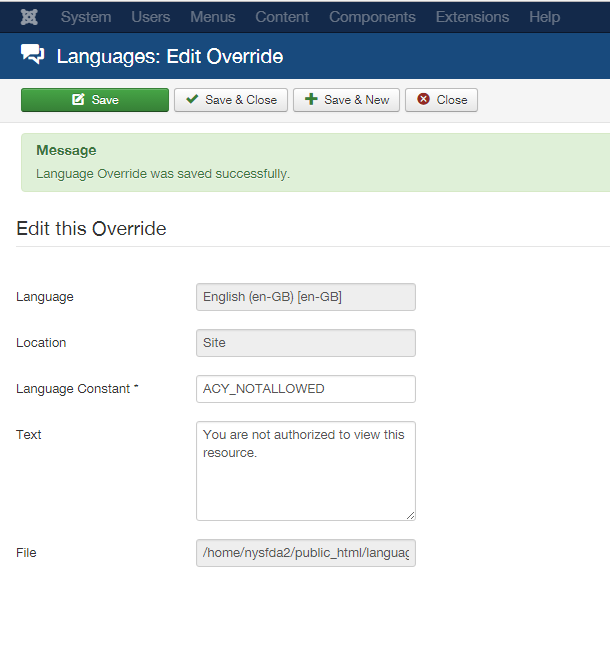
You can do it via language override feature – go to Extensions -> languages -> Override -> New – and add your text for string "ACY_NOTALLOWED"
Regards
January 19, 2017 at 8:47 pm #1003896I did as instructed and nothing has changed. See screenshot.
I’m still getting the default error message.
I did notice that under the area labeled "file" there’s a different file path that’s displayed in your screenshot than appeared when I went in to make the edit. I’m not sure if that has anything to do with it. I’m not a developer so I really have no idea.
Thanks
pavit
- Join date:
- September 2007
- Posts:
- 15749
- Downloads:
- 199
- Uploads:
- 2274
- Thanks:
- 417
- Thanked:
- 4028 times in 3778 posts
January 19, 2017 at 9:04 pm #1003901The account provided above for the administrator page doesn’t work , if you correct it i will have a look at it directly.
January 20, 2017 at 1:47 pm #1004098This reply has been marked as private.pavit
- Join date:
- September 2007
- Posts:
- 15749
- Downloads:
- 199
- Uploads:
- 2274
- Thanks:
- 417
- Thanked:
- 4028 times in 3778 posts
January 20, 2017 at 2:11 pm #1004109Hello
I posted above a different string
The correct string to override is JERROR_ALERTNOAUTHOR
I added it and now it is showing on the page as requested.
Regards
January 20, 2017 at 4:23 pm #1004138Excellent! I see that it is working now.
Thank you!
AuthorPostsViewing 6 posts - 1 through 6 (of 6 total)This topic contains 6 replies, has 2 voices, and was last updated by
nysfda 8 years ago.
The topic ‘How do I edit the "not authorized" error message’ is closed to new replies.
Jump to forum
melih