-
AuthorPosts
-
kugelmeier Friend
kugelmeier
- Join date:
- October 2008
- Posts:
- 102
- Downloads:
- 65
- Uploads:
- 60
- Thanks:
- 7
- Thanked:
- 2 times in 2 posts
July 13, 2016 at 8:40 am #949539Hallo,
I have some problems. First how I get the distance of the headline (article or menue headline) on one line to the modules on sidebar 1 and 2. (please look the file) and is it possible to get the distance from the modules + main text smaller to the positions 1-4?
On the IPhone the pictures of the position 1/2/3/4 are too big and not under the other. What is the reason for it?
Thanks
Klaus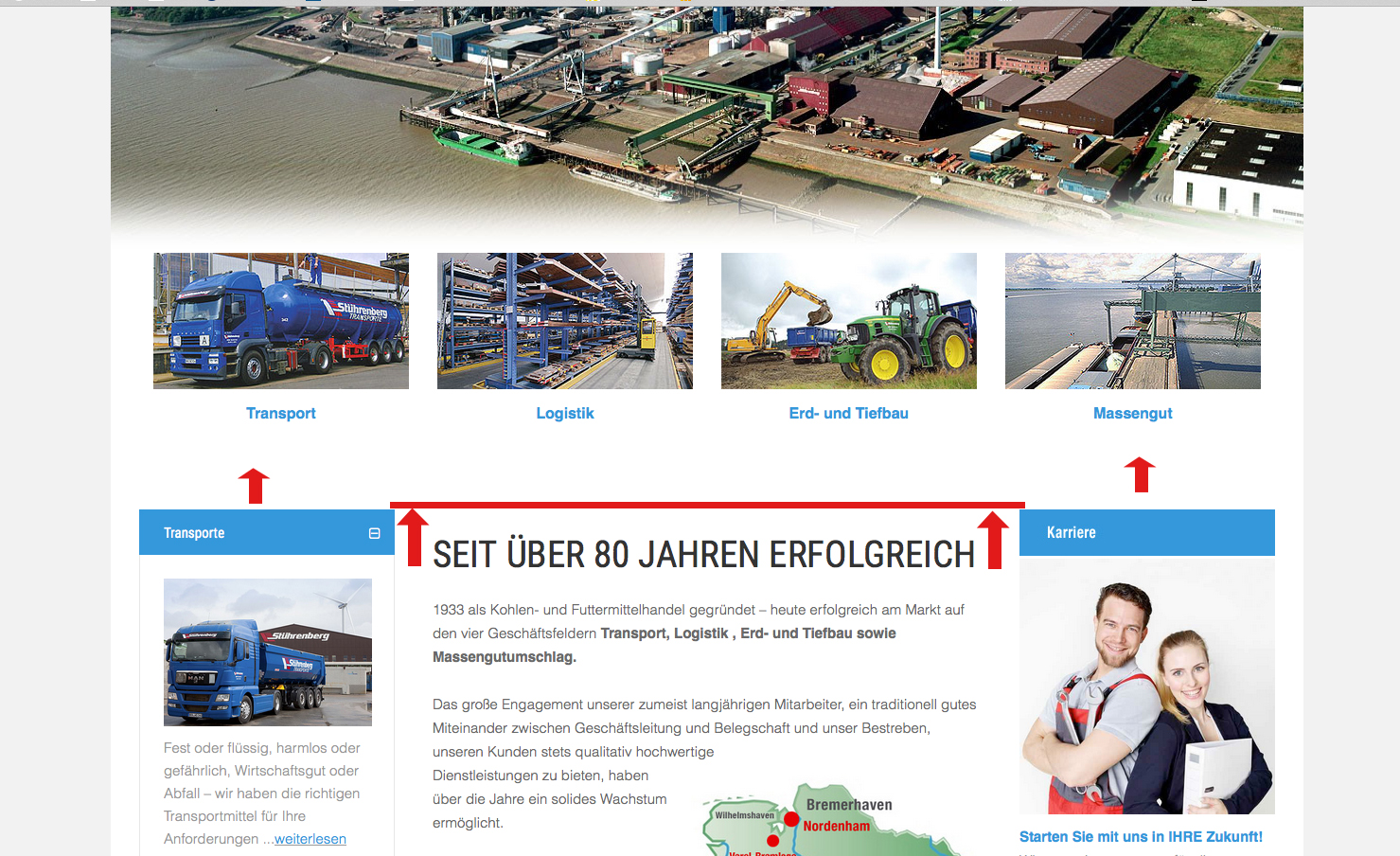

 Pankaj Sharma
Moderator
Pankaj Sharma
Moderator
Pankaj Sharma
- Join date:
- February 2015
- Posts:
- 24589
- Downloads:
- 144
- Uploads:
- 202
- Thanks:
- 127
- Thanked:
- 4196 times in 4019 posts
July 13, 2016 at 8:51 am #949551Hi Go to custom.css file add below code for this first question
.itemid-101 .t3-content { padding-top: 0px; }Path : /css/custom.css file , if file is not present then create it .
For module position issue , you need to increase the module position width to maximum for mobile Go to template options > Layout > Responsive layout > Extra small Drag and move the position to right like this : http://prntscr.com/bsauzi Do the same for other positions . http://prntscr.com/bsavar Hope it helps .
kugelmeier
- Join date:
- October 2008
- Posts:
- 102
- Downloads:
- 65
- Uploads:
- 60
- Thanks:
- 7
- Thanked:
- 2 times in 2 posts
July 13, 2016 at 9:48 am #949605Hallo,
thanks, but nothing happens with the added code in the custom.css
(templates/ja_medicare/css/custom.css)Pankaj Sharma
Moderator
Pankaj Sharma
- Join date:
- February 2015
- Posts:
- 24589
- Downloads:
- 144
- Uploads:
- 202
- Thanks:
- 127
- Thanked:
- 4196 times in 4019 posts
July 13, 2016 at 10:10 am #949617Hi
add a dot before the itemid class .
Like below.itemid-101 .t3-content { padding-top: 0px; }kugelmeier
- Join date:
- October 2008
- Posts:
- 102
- Downloads:
- 65
- Uploads:
- 60
- Thanks:
- 7
- Thanked:
- 2 times in 2 posts
July 14, 2016 at 7:43 am #950047Hallo,
thank you very much, on the IPhone it looks now better. How I deactive the slideshow in the "Extra small" Responsive Layout?
Another question – is it possible to get the distance from the modules + main text smaller to the positions 1-4? Please have a look to the first attachment withe the two arrows.
Regards
KlausPankaj Sharma
Moderator
Pankaj Sharma
- Join date:
- February 2015
- Posts:
- 24589
- Downloads:
- 144
- Uploads:
- 202
- Thanks:
- 127
- Thanked:
- 4196 times in 4019 posts
July 14, 2016 at 7:55 am #950051Hi
You can hide the slideshow position from small views by click on Eye icon in near module name in template responsive layout tab .
For reduce the distance add below code in custom.css file.t3-sl { padding-bottom: 10px; }before the value was 50px
1 user says Thank You to Pankaj Sharma for this useful post
-
AuthorPosts
Viewing 6 posts - 1 through 6 (of 6 total)This topic contains 5 replies, has 2 voices, and was last updated by
Pankaj Sharma 8 years, 6 months ago.We moved to new unified forum. Please post all new support queries in our New Forum
Jump to forum
melih

