-
AuthorPosts
-
December 20, 2014 at 11:47 am #203689
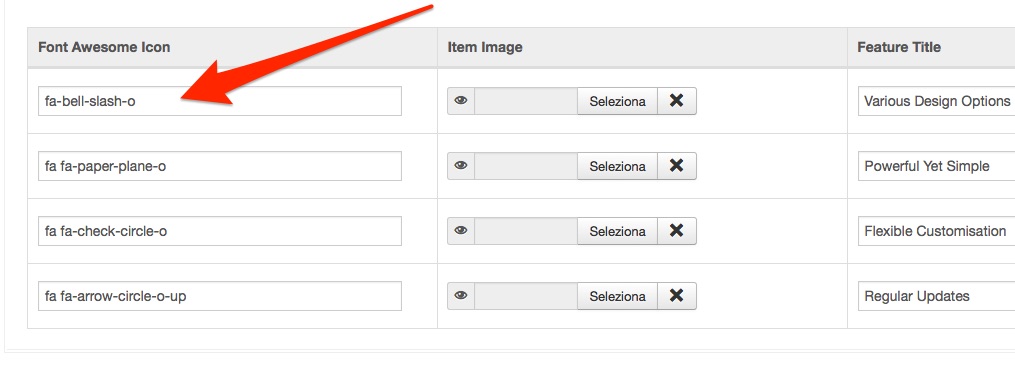
Hello , I am trying to change the icons of the form JACM featured intro.Copy and and paste the name of the new icon from the site http://fortawesome.github.io/Font-Awesome/icons/ as shown in the photo .
But it does not work ..
Where am I wrong?pavit Moderator
pavit
- Join date:
- September 2007
- Posts:
- 15749
- Downloads:
- 199
- Uploads:
- 2274
- Thanks:
- 417
- Thanked:
- 4028 times in 3778 posts
December 20, 2014 at 12:03 pm #559232Hi
Did you tried to clean your cache ?
I just tested it and worked fine
jooservices Friend
jooservices
- Join date:
- October 2014
- Posts:
- 8556
- Downloads:
- 0
- Uploads:
- 130
- Thanked:
- 1245 times in 1121 posts
December 20, 2014 at 12:26 pm #559233Hi there
This issue already asked by another with similar issue.
# You need to know which FA version using on your site. For Uber:
http://uber.demo.joomlart.com/
This’s what i have on demo site
http://uber.demo.joomlart.com/templates/uber/fonts/font-awesome/css/font-awesome.min.css
They are using
* Font Awesome 4.2.0 by @davegandy - http://fontawesome.io - @fontawesome
And now you can know right code to use for 4.2.0
http://fontawesome.io/icon/bell-slash-o/
You can inspect rendered HTML on site to know if it’s applied for with right class
Thank you,
Viet VuDecember 20, 2014 at 1:54 pm #559235<em>@pavit 458292 wrote:</em><blockquote>Hi
Did you tried to clean your cache ?
I just tested it and worked fine </blockquote>
Yes, you are clean cache ste and cache bakend joomla..:((
December 20, 2014 at 2:10 pm #559236I solved .
Simply had to add code to the FA then : fa- youtube
becomes : fa fa – youtube
Thank YouAuthorPostsViewing 5 posts - 1 through 5 (of 5 total)This topic contains 5 replies, has 3 voices, and was last updated by
misteradamello 10 years, 1 month ago.
We moved to new unified forum. Please post all new support queries in our New Forum
Jump to forum
melih