-
AuthorPosts
-
November 17, 2008 at 3:02 pm #135430
Hi All,
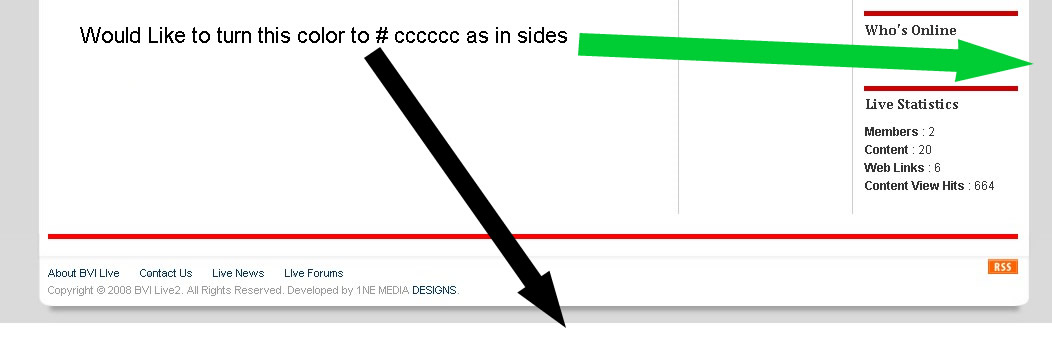
Here’s an interesting thing i’m sure some one else will run into or if not have. On my site i have worked on special design astetics of which includes adding a shadow to the footer back ground image i’ve added. Only thing is there is a white horizontal space that i cannot get changed to the color i want used to give a smooth continuation which is #cccccc below the footer. i’ve tried tweaking every index file i could fine. where can i make this change and have my design complete.
Ive attached a screen shot
Please note i’m also using a back ground image in the body so i would like a fix that effects the real back ground not the image
Thanks anyone for a nice answer that could lead to a solution.
scotty Friend
scotty
- Join date:
- March 2008
- Posts:
- 2339
- Downloads:
- 0
- Uploads:
- 13
- Thanks:
- 76
- Thanked:
- 827 times in 595 posts
November 17, 2008 at 7:17 pm #279444change template.css line 23 (on un-edited .css)
from…
body#bd {

background:#FFFFFF none repeat scroll 0 0;

color:#333333;

}
to…
body#bd {

background:#CCCCCC none repeat scroll 0 0;

color:#333333;

}November 18, 2008 at 12:00 am #279464Hi Scotty,
Yup that did the trick, i attached a snap shot. thanks so much. Can u also check my post here http://www.joomlart.com/forums/topic/content-over-flow-in-teline-ii-in-ie7/
and see if you can help me with why this is happening? see the same attached snap shotThanks again Scotty
AuthorPostsViewing 3 posts - 1 through 3 (of 3 total)This topic contains 3 replies, has 2 voices, and was last updated by
belk1n 16 years, 2 months ago.
We moved to new unified forum. Please post all new support queries in our New Forum
Jump to forum
melih