-
AuthorPosts
-
 Pankaj Sharma
Moderator
Pankaj Sharma
Moderator
Pankaj Sharma
- Join date:
- February 2015
- Posts:
- 24589
- Downloads:
- 144
- Uploads:
- 202
- Thanks:
- 127
- Thanked:
- 4196 times in 4019 posts
March 26, 2016 at 10:43 am #904915Hi
Just replace the favicon with your favicon in the template folder As u can see in the path in source code .
https://docs.joomla.org/Changing_the_site_favicon
You need to clean your Joomla and browser cache to see changes . Sometime favicon appear after some time due to cache .chrisswift Friend
chrisswift
- Join date:
- February 2016
- Posts:
- 32
- Downloads:
- 11
- Uploads:
- 17
- Thanks:
- 1
- Thanked:
- 1 times in 1 posts
March 26, 2016 at 11:29 am #904921Thanks for that link. I have looked at that information before and here’s where I’m stuck (please see attached image from that page). I’m looking in the "My favicon is in another location" section of that page (please tell me if this is the wrong section) and it says to go to yoursite.com/templates/your_template/icon/favicon.ico.
What is "your template"? I’ve looked in JA_University_t3 – Default/Home/ and Blue Color and see no folder named "icon". I’ve expanded many folders in those templates (e.g., Blue Color > images > ico) and see nothing named favicon.ico.
Thanks for any help.
Pankaj Sharma
Moderator
Pankaj Sharma
- Join date:
- February 2015
- Posts:
- 24589
- Downloads:
- 144
- Uploads:
- 202
- Thanks:
- 127
- Thanked:
- 4196 times in 4019 posts
March 26, 2016 at 11:29 pm #905071Hi
The path is not Theme its template folder . /templates/ja_university_t3/
Look at example Here > http://prntscr.com/akh2v0chrisswift
- Join date:
- February 2016
- Posts:
- 32
- Downloads:
- 11
- Uploads:
- 17
- Thanks:
- 1
- Thanked:
- 1 times in 1 posts
March 27, 2016 at 6:14 am #905088I’ve gone to Extensions > Templates and I do not have a template called ja_university_t3. I do have no fewer than ten templates, though – ja_university_t3-Default / Home / Blue, brown, green grey, iron, purple, teal, and violet.
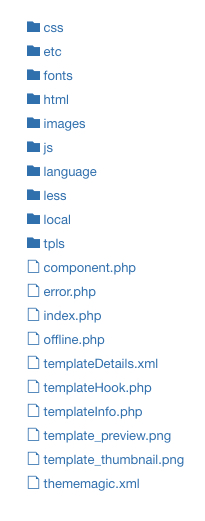
Every one of the them I click on has exactly the same file structure (please see first image) with no favicon listed.
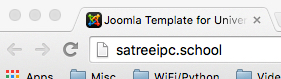
And here’s a weirder thing: in Chrome, the favicon renders in the tab (2nd image) but in Safari, it doesn’t (3rd image)! I understand that changes like this can take time to render, but I’ve never changed anything.
I can drop the favicon.ico in a template but please tell me which one to drop it in – I’m guessing default, home, or blue. Or all of them?
 Pankaj Sharma
Moderator
Pankaj Sharma
Moderator
Pankaj Sharma
- Join date:
- February 2015
- Posts:
- 24589
- Downloads:
- 144
- Uploads:
- 202
- Thanks:
- 127
- Thanked:
- 4196 times in 4019 posts
March 27, 2016 at 4:01 pm #905153Hi
kindly open the template folder via FTP or cpanel . There u can the fav icon . If still problem . Post your site super user details and FTP details here with attached favicon file .I will change it for you with same process .chrisswift
- Join date:
- February 2016
- Posts:
- 32
- Downloads:
- 11
- Uploads:
- 17
- Thanks:
- 1
- Thanked:
- 1 times in 1 posts
March 27, 2016 at 7:34 pm #905214Oooooh, I get it – actually look in the server files!
Indeed!
- There is only one template
- The favicon in there
Problem solved. Thanks again for your help. Wow!
AuthorPostsViewing 6 posts - 1 through 6 (of 6 total)This topic contains 6 replies, has 2 voices, and was last updated by
chrisswift 8 years, 10 months ago.
The topic ‘Changing the favicon’ is closed to new replies.
Jump to forum
melih


