-
AuthorPosts
-
March 23, 2016 at 3:57 pm #903932
Hi. you could help me to change the image of the heart, the clock for the template "ja-medical …"
I publish a print screen for that you can see what I need.
http://www.pergolasdelnorte.com.ar/images/resized/images/resized/images/mesasdejardin/plantilla.gifpavit Moderator
pavit
- Join date:
- September 2007
- Posts:
- 15749
- Downloads:
- 199
- Uploads:
- 2274
- Thanks:
- 417
- Thanked:
- 4028 times in 3778 posts
March 23, 2016 at 4:05 pm #903934Hi
Such icons are coming from font-awesome website
To change them with other font-awesome icons you can edit file template.css in this folder /templates/ja_medicare/css/.t3-module.box-icon-note:before { content: "\f0f8"; } .t3-module.box-icon-clock:before { content: "\f017"; } .t3-module.box-icon-heart:before { content: "\f004"; }and change the "code"; with your preferred font-awesome new icon
Hope it helps
April 27, 2016 at 8:01 am #923326Hi,
I tried this but it’s not working for me. I changed the code and the name in template.css, and also in backend, but I get only blank box, without the picture.
Any suggestions?
Thnxpavit
- Join date:
- September 2007
- Posts:
- 15749
- Downloads:
- 199
- Uploads:
- 2274
- Thanks:
- 417
- Thanked:
- 4028 times in 3778 posts
April 27, 2016 at 8:35 am #923354Hi there
You should change only the unicode in template.css file
example:
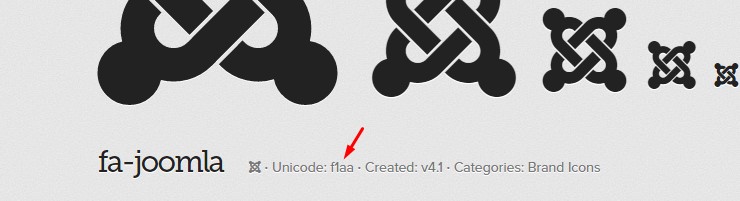
If you want to change the icon-hearth to Joomla icon then you need to find the icon Joomla unicode on font-awesome website
Then copy the unicode f1aa overriding the unicode for icon-hearth in template.css filefrom :
.t3-module.box-icon-heart:before {
  content: "\f004";
}
To :
.t3-module.box-icon-heart:before {
  content: "\f1aa";
}
Look at the result
 April 27, 2016 at 10:53 am #923409
I did that, and i still get only heart 🙁
I even tried to replace the code in the font-awesome.css but nothing.pavit
- Join date:
- September 2007
- Posts:
- 15749
- Downloads:
- 199
- Uploads:
- 2274
- Thanks:
- 417
- Thanked:
- 4028 times in 3778 posts
April 27, 2016 at 10:55 am #923411I even tried to replace the code in the font-awesome.css but nothing.
Share here as private reply a temp super user account to your backend so we can have a look at the problem
April 27, 2016 at 2:12 pm #923497This reply has been marked as private.pavit
- Join date:
- September 2007
- Posts:
- 15749
- Downloads:
- 199
- Uploads:
- 2274
- Thanks:
- 417
- Thanked:
- 4028 times in 3778 posts
April 27, 2016 at 3:06 pm #923530The account provided above doesn’t works, could you double check it ?
April 27, 2016 at 6:44 pm #923622This reply has been marked as private.pavit
- Join date:
- September 2007
- Posts:
- 15749
- Downloads:
- 199
- Uploads:
- 2274
- Thanks:
- 417
- Thanked:
- 4028 times in 3778 posts
April 27, 2016 at 6:58 pm #923626You are using /local folder so your changes should be done in this file /templates/ja_medicare/local/css/template.css
I changed hearth icon with Joomla icon changing the unicode value and as you can see from your home it works fine.
Regards
1 user says Thank You to pavit for this useful post
April 28, 2016 at 10:59 am #923920This reply has been marked as private.pavit
- Join date:
- September 2007
- Posts:
- 15749
- Downloads:
- 199
- Uploads:
- 2274
- Thanks:
- 417
- Thanked:
- 4028 times in 3778 posts
April 28, 2016 at 11:36 am #923938how can i make this button not to be white on hover?
I restored correct settings for it
I disabled the development mode so you can see on front-end the resultes of customizations
Regards
P.S.
Since we resolved the problem you had with the hearth icon on module , if you need other help with other issues, would be better to open new topics , in this way solutions proposed can help also other users.
1 user says Thank You to pavit for this useful post
-
AuthorPosts
Viewing 12 posts - 1 through 12 (of 12 total)This topic contains 11 replies, has 3 voices, and was last updated by
pavit 8 years, 9 months ago.
We moved to new unified forum. Please post all new support queries in our New Forum
Jump to forum
melih