-
AuthorPosts
-
 natali.klochan
Friend
natali.klochan
Friend
natali.klochan
- Join date:
- August 2016
- Posts:
- 107
- Downloads:
- 677
- Uploads:
- 59
- Thanks:
- 3
- Thanked:
- 3 times in 2 posts
October 12, 2016 at 4:06 am #975536Hi guys.
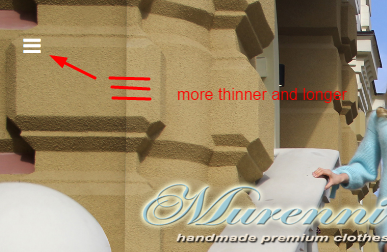
Tell me please how can I change style of button canvas menu – 3 horizontal lines?
I want to make these lines thinner and longer.
Thanks. Pankaj Sharma
Moderator
Pankaj Sharma
Moderator
Pankaj Sharma
- Join date:
- February 2015
- Posts:
- 24589
- Downloads:
- 144
- Uploads:
- 202
- Thanks:
- 127
- Thanked:
- 4196 times in 4019 posts
October 12, 2016 at 5:02 am #975547Hi
This icon from font-awesome , you can add below code in custom.css file and add further styling on it , like font-size , color etc ..fa-navicon:before, .fa-reorder:before, .fa-bars:before { font-size:10px!important;}natali.klochan
Friend
natali.klochan
- Join date:
- August 2016
- Posts:
- 107
- Downloads:
- 677
- Uploads:
- 59
- Thanks:
- 3
- Thanked:
- 3 times in 2 posts
October 13, 2016 at 1:13 am #975820I understand.
I can change color and font-size for this element.
But I can’t to find a rule, that lines will be thinner and longer.
I want that style of this element will be like website fiorito.nl (photo 1).
I see that element (on this website) has a font-size 25px, but I can’t understand what rule change thickness this lines.
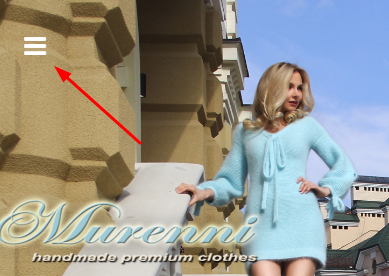
I make in my site font-size 25 px but this lines very bold (photo 2)
Tell me please how can I change this style?
Thanks.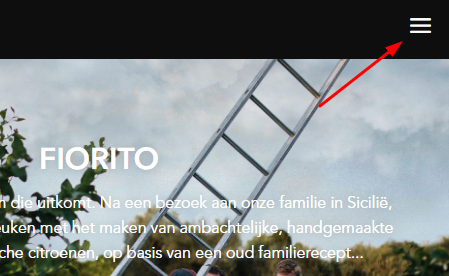
 Pankaj Sharma
Moderator
Pankaj Sharma
Moderator
Pankaj Sharma
- Join date:
- February 2015
- Posts:
- 24589
- Downloads:
- 144
- Uploads:
- 202
- Thanks:
- 127
- Thanked:
- 4196 times in 4019 posts
October 13, 2016 at 1:43 am #975829Hi
the default style of the font is coming from Font-awesome , I suggest you use your own icon image by adding below code in custom.css file.fa-navicon:before, .fa-reorder:before, .fa-bars:before { content: url(/images/joomlart/logo/default/DDsquarelogo.png)!important; }chnage the image path with your own designed icon image .
natali.klochan
Friend
natali.klochan
- Join date:
- August 2016
- Posts:
- 107
- Downloads:
- 677
- Uploads:
- 59
- Thanks:
- 3
- Thanked:
- 3 times in 2 posts
October 13, 2016 at 2:47 am #975849Understand. but it is technically possible to change the font style (font-awesome) only for this element? at foirito.nl this element has a image or font-style? thanks
Pankaj Sharma
Moderator
Pankaj Sharma
- Join date:
- February 2015
- Posts:
- 24589
- Downloads:
- 144
- Uploads:
- 202
- Thanks:
- 127
- Thanked:
- 4196 times in 4019 posts
October 13, 2016 at 3:20 am #975855Hi
sorry, i am not able to understand your question . The change in the style code will replace this icon with your image .
natali.klochan
Friend
natali.klochan
- Join date:
- August 2016
- Posts:
- 107
- Downloads:
- 677
- Uploads:
- 59
- Thanks:
- 3
- Thanked:
- 3 times in 2 posts
October 13, 2016 at 3:48 am #975864Pankaj, tell me please, can I use icon for fa-bars from icomoon library (not font-awesome)?
I see that website fiorito.nl is used icomoon library.
just my customer wants is such an icon (like fiorito.nl) and I’m trying to understand how to do it.Pankaj Sharma
Moderator
Pankaj Sharma
- Join date:
- February 2015
- Posts:
- 24589
- Downloads:
- 144
- Uploads:
- 202
- Thanks:
- 127
- Thanked:
- 4196 times in 4019 posts
October 13, 2016 at 5:51 am #975896This reply has been marked as private.natali.klochan
Friend
natali.klochan
- Join date:
- August 2016
- Posts:
- 107
- Downloads:
- 677
- Uploads:
- 59
- Thanks:
- 3
- Thanked:
- 3 times in 2 posts
October 15, 2016 at 7:57 am #976554Pankaj, I have used your recommendation and create own image.
Great thanks for your help.-
AuthorPosts
Viewing 9 posts - 1 through 9 (of 9 total)This topic contains 8 replies, has 2 voices, and was last updated by
natali.klochan 8 years, 3 months ago.We moved to new unified forum. Please post all new support queries in our New Forum
Jump to forum
melih