-
AuthorPosts
-
March 23, 2012 at 3:24 pm #175331
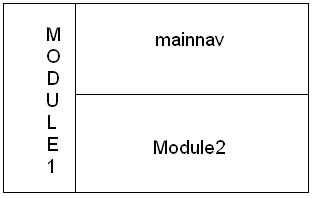
Good morning! I try to change standard layout in T3 blank template. I want to have this:
But i could not find any information how to do it in header…
Please help me!khoand Friend
khoand
- Join date:
- February 2011
- Posts:
- 4500
- Downloads:
- 0
- Uploads:
- 179
- Thanks:
- 169
- Thanked:
- 1166 times in 1060 posts
March 24, 2012 at 3:41 pm #445482You create a new file which name is /templates/your_template/block/mainnavnew.php
	<div id="ja-col1">

		<jdoc:include type="modules" name="module1" />

	</div>

	<div id="ja-col2">

		<?php if (($jamenu = $this->loadMenu())) $jamenu->genMenu (); ?>

		<!-- jdoc:include type="menu" level="0" / -->
<?php if ($this->hasSubmenu() && ($jamenu = $this->loadMenu())) : ?>
<div id="ja-subnav" class="clearfix">
<?php $jamenu->genMenu (1); ?>
<!-- jdoc:include type="menu" level="1" / -->
</div>
<?php endif;?><jdoc:include type="modules" name="module2" />
</div>
You add the code into /templates/your_template/css/template.css
#ja-col1{

float:left;

width:30%;

}

#ja-col2{

float:right;

width:70%;

}
You login backend > extensions > template manager > your_template > layout tab > edit default layout > replace the code
<block name="mainnav" type="mainnav" main-inner="1"></block>
with
<block name="mainnavnew" type="mainnavnew"></block>AuthorPostsViewing 2 posts - 1 through 2 (of 2 total)This topic contains 2 replies, has 2 voices, and was last updated by
khoand 12 years, 10 months ago.
We moved to new unified forum. Please post all new support queries in our New Forum
Change layout (problems with mainnav)
Viewing 2 posts - 1 through 2 (of 2 total)