

Tagged: Ja-playstore
-
AuthorPosts
-
pavit Moderator
pavit
- Join date:
- September 2007
- Posts:
- 15749
- Downloads:
- 199
- Uploads:
- 2274
- Thanks:
- 417
- Thanked:
- 4028 times in 3778 posts
March 4, 2016 at 11:18 am #894711Hi there
Would be better for us, if you can post a screenshot of all your desired changes, in this way we can better answer with a solution.
1 user says Thank You to pavit for this useful post
softchris4ol Friend
softchris4ol
- Join date:
- October 2013
- Posts:
- 46
- Downloads:
- 44
- Uploads:
- 39
- Thanks:
- 14
- Thanked:
- 1 times in 1 posts
March 4, 2016 at 11:23 am #894713Please, just tell me how to change the background colour of JA-Player Template.
Also, tell me how to position my module at the Auto Component, inbetween Siderbar1 and Siderbar2.
Best Regards.
pavit
- Join date:
- September 2007
- Posts:
- 15749
- Downloads:
- 199
- Uploads:
- 2274
- Thanks:
- 417
- Thanked:
- 4028 times in 3778 posts
March 4, 2016 at 11:47 am #894731Please, just tell me how to change the background colour of JA-Player Template.
There is not only 1 backgrund image or color that you can change, so as i asked above provide a screenshot with desired changes , or if you do not want to provide it , you can use firebug extension and check directly on your website changes to be done
Also, tell me how to position my module at the Auto Component, inbetween Siderbar1 and Siderbar2.
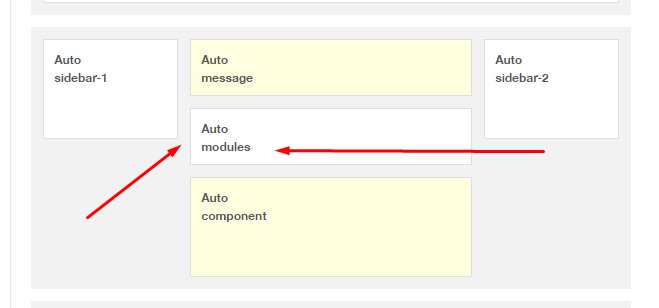
Auto component doesn’t exsist , that’s the default position where joomla publish content , ( article ) so you cannot publish modules there, If you want to add a new position between message and component ( as showed in my image) then you will need to modify a php file
Let me know if this is what you want and i will tell you what to do
1 user says Thank You to pavit for this useful post
softchris4ol
- Join date:
- October 2013
- Posts:
- 46
- Downloads:
- 44
- Uploads:
- 39
- Thanks:
- 14
- Thanked:
- 1 times in 1 posts
March 4, 2016 at 12:01 pm #894741Yes, I want to modify that image you sent; so I can place my module there. I dont want the Auto, I want something I can modify. "Auto component doesn’t exsist , that’s the default position where joomla publish content , ( article ) so you cannot publish modules there, If you want to add a new position between message and component ( as showed in my image) then you will need to modify a php file" YES, show me how to do it
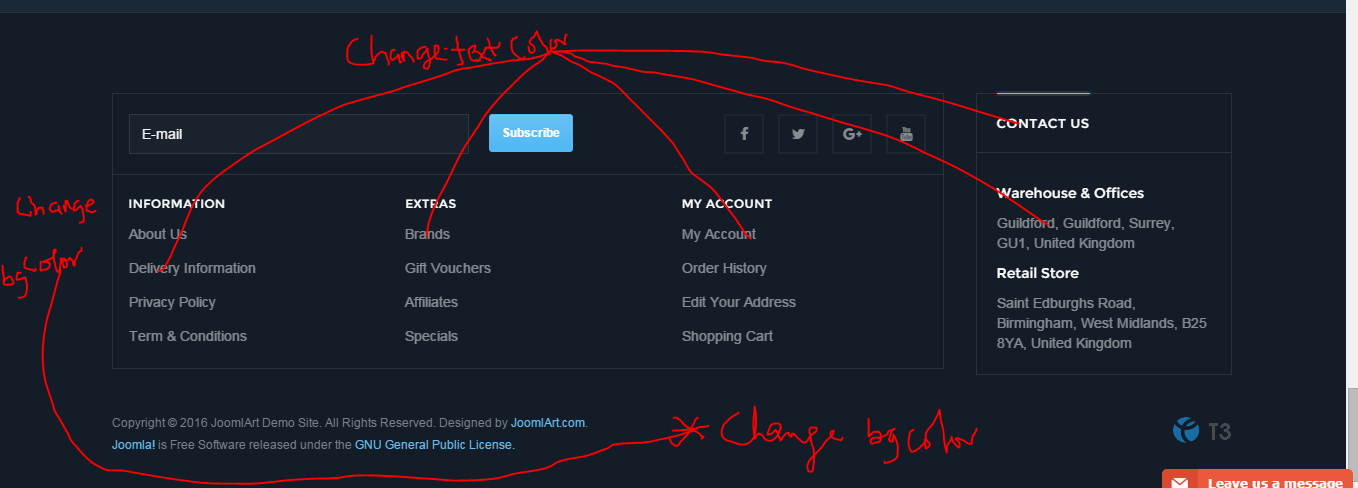
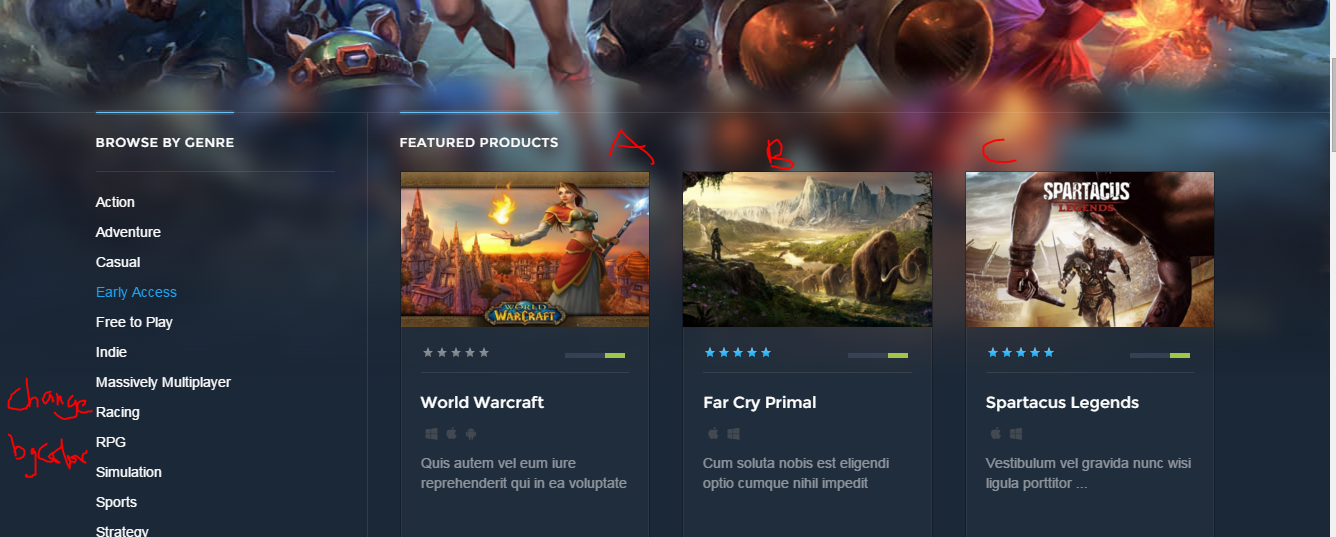
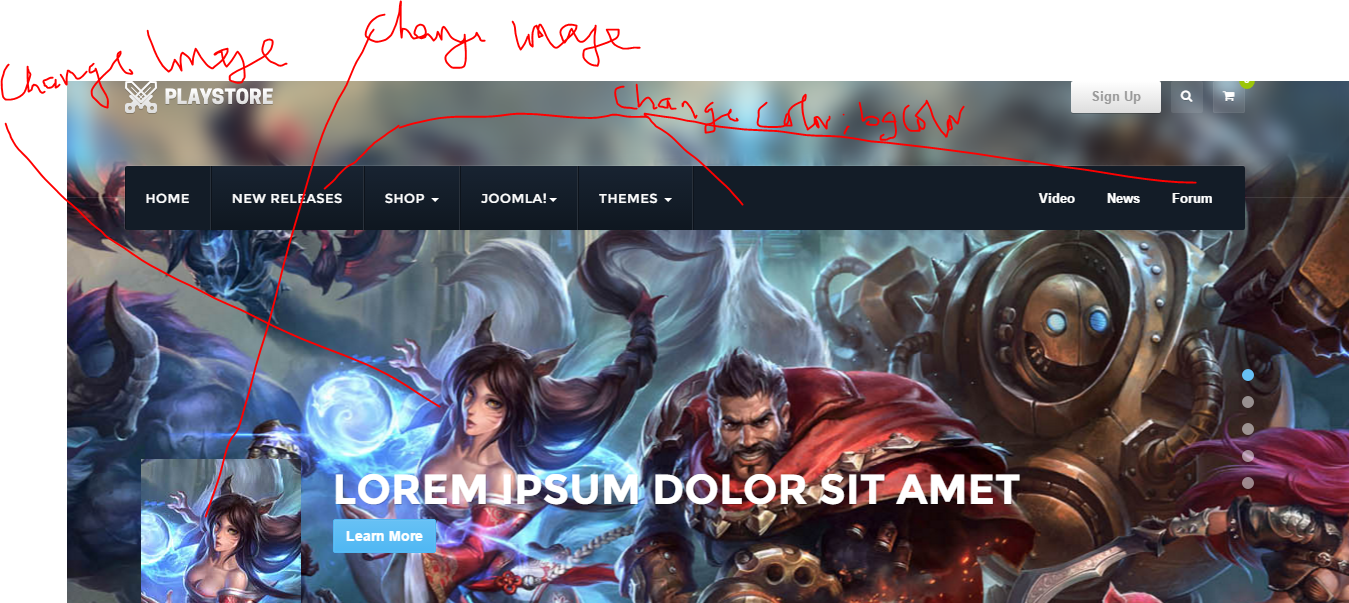
I have also attached several other images, kindly find the full description of what to do on the images. I marked with red what I want to achieve.
I have also provided the admin login to my site, you can check it if you’re Admin.
Thank you so much.
softchris4ol
- Join date:
- October 2013
- Posts:
- 46
- Downloads:
- 44
- Uploads:
- 39
- Thanks:
- 14
- Thanked:
- 1 times in 1 posts
March 4, 2016 at 12:03 pm #894746Note, Where I marked A, B, C. I want to remove that I place my modules there.
pavit
- Join date:
- September 2007
- Posts:
- 15749
- Downloads:
- 199
- Uploads:
- 2274
- Thanks:
- 417
- Thanked:
- 4028 times in 3778 posts
March 4, 2016 at 5:06 pm #894945Hi
to change footer background add this to your custom.css in this folder /templates/ja_playstore/css , you should manually create this new file in that folder
.t3-footer {
background: #yourcolor!important;
}
To change footer module title add this
.t3-footnav .t3-module .module-title {
color:#yourcolor!important;
}
To change footer modules links color
.t3-footnav .t3-module ul > li > a {
color:#yourcolor!important;
}
To change contact-us module title color
.t3-footnav-right .t3-module .module-title {
color:#yourcolor!important;
}
2nd image
To change background add this to custom.css file
.t3-wrapper {
background: #yourcolor!important;
}
Regarding positions A – B – C
you cannot add your modules there, they are generated by the Virtuemart component
so you can add your products and change them but not your custom modules3rd image
to change background image you should edit module named slideshow in position slideshow
and add your custom images when requested into module settingsTo change background color of mainnav ( menu at top ) add this to your custom.css file
.navbar-default .t3-navbar {
background-color:#yourcolor!important;
}
to change mainnav items color add this
.navbar-default .navbar-nav > li > a {
color:#yourcolor!important;
}
Anyway you can find documentation HERE
Also some changes requires a bit of knowledge of Joomla extensions and how they works, i can suggest to hire a developer to apply all these customizations as you requested.
Best regards
1 user says Thank You to pavit for this useful post
softchris4ol
- Join date:
- October 2013
- Posts:
- 46
- Downloads:
- 44
- Uploads:
- 39
- Thanks:
- 14
- Thanked:
- 1 times in 1 posts
March 5, 2016 at 9:36 pm #895340Thank you so much. I’m working with your instructions.
Please, I really need to remove the virtualmart and have access to that position. I dont need the product. I want to place a module there.
pavit
- Join date:
- September 2007
- Posts:
- 15749
- Downloads:
- 199
- Uploads:
- 2274
- Thanks:
- 417
- Thanked:
- 4028 times in 3778 posts
March 5, 2016 at 9:48 pm #895344Please, I really need to remove the virtualmart and have access to that position. I dont need the product. I want to place a module there.
You can uninstall or unpublish virtuemart component and create a new menu item and use available positions to add your modules
1 user says Thank You to pavit for this useful post
softchris4ol
- Join date:
- October 2013
- Posts:
- 46
- Downloads:
- 44
- Uploads:
- 39
- Thanks:
- 14
- Thanked:
- 1 times in 1 posts
March 6, 2016 at 9:01 am #895449Thank you, Ma; for your support.
Please, I want to know if I uninstall the virtualmart, will the default position be removed; so I can place my module in that space.
I noticed that when I changed the image of the slideshow, the image spans more than the specified size. I used 1920 x 1080. But, the images are not fixed; I’m not seeing the full size of the image. Kindly look into it.
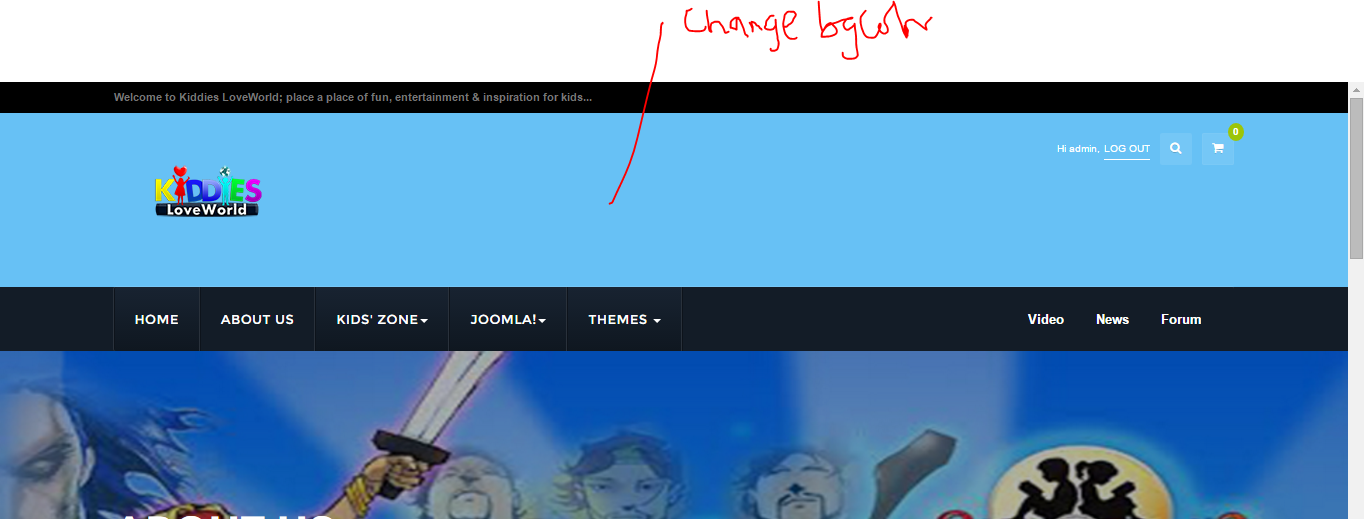
Kindly find the attached image and tell me how to make changes to marked areas.
Your support has been so helpful.
Thank you so much.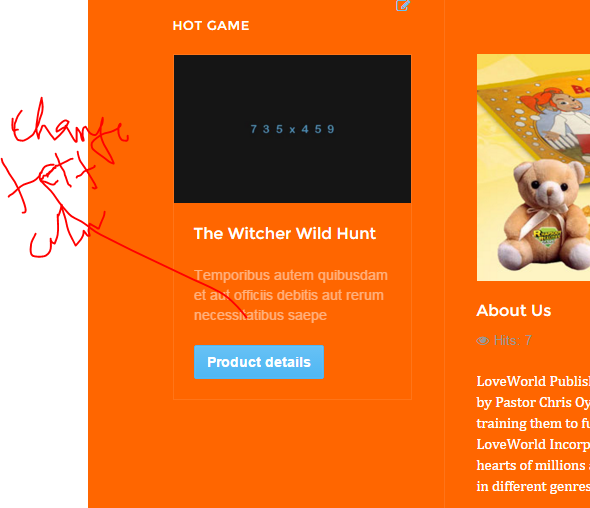
softchris4ol
- Join date:
- October 2013
- Posts:
- 46
- Downloads:
- 44
- Uploads:
- 39
- Thanks:
- 14
- Thanked:
- 1 times in 1 posts
March 6, 2016 at 9:03 am #895452You can see the admin login to my site
pavit
- Join date:
- September 2007
- Posts:
- 15749
- Downloads:
- 199
- Uploads:
- 2274
- Thanks:
- 417
- Thanked:
- 4028 times in 3778 posts
March 6, 2016 at 11:30 am #895479Please, I want to know if I uninstall the virtualmart, will the default position be removed; so I can place my module in that space.
Hi
I’m sorry to say that this cannot be done
Template Homepage is using as page type a specific virtuemart page type "Front page" this specific layout divide grid as per virtuemart settings , so all the changes are made from virtuemart and not from JA Playstore template manager,( articles showed into a grid of 3 per row ) to obtain what you need you will need to customize layout and add new positions available to publish your modules .
I noticed that when I changed the image of the slideshow, the image spans more than the specified size. I used 1920 x 1080. But, the images are not fixed; I’m not seeing the full size of the image. Kindly look into it.
Since this topic title is a bit different from your new question , would be better to open a new topic so other users can find specific answer and solutions in their searches if they should have problem like your.
Thanks
1 user says Thank You to pavit for this useful post
softchris4ol
- Join date:
- October 2013
- Posts:
- 46
- Downloads:
- 44
- Uploads:
- 39
- Thanks:
- 14
- Thanked:
- 1 times in 1 posts
March 6, 2016 at 11:32 am #895481I couldn’t upload fresh post. Please, attend to me here.
Thank you so much
Hi,
I was using Ja-Player before, but due to some restrictions by virtualmart, I had to change the Template.
Now, I am using the newest Template; JA-Moviemax. I am finding it interesting and it very interesting. And it’s meeting my needs.
Please, kindly find the attached JPEGs and attend to my needs.
I want to make some changes:
A
Check: change1.png
I was able to change the background colour of the footer t3, but the inner parts turned black. How can I change the colour of the inner part to the same colour of the footer. See change1
Also, how can I change the text colours. See change1B
Check: change2.png
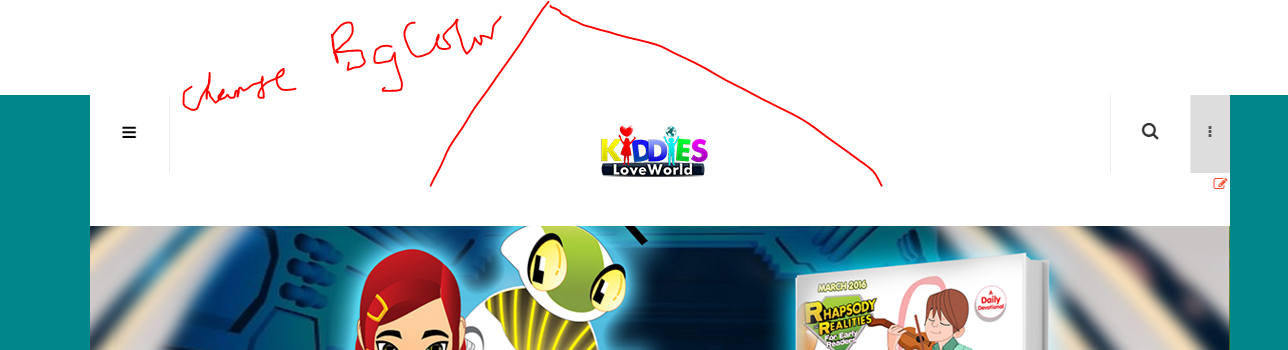
How can I change the colour of the top. Currently it’s showing white. I want to change it to my desired colour.
Also, I observed that the ‘login’ is not available on the page. How can I activate that?
Also, how can I change the direction of the menu, if possible. Though, I like the idea of the menu by the side, I just want to know if it’s possbile to change the direction/positioning of the main menu.C
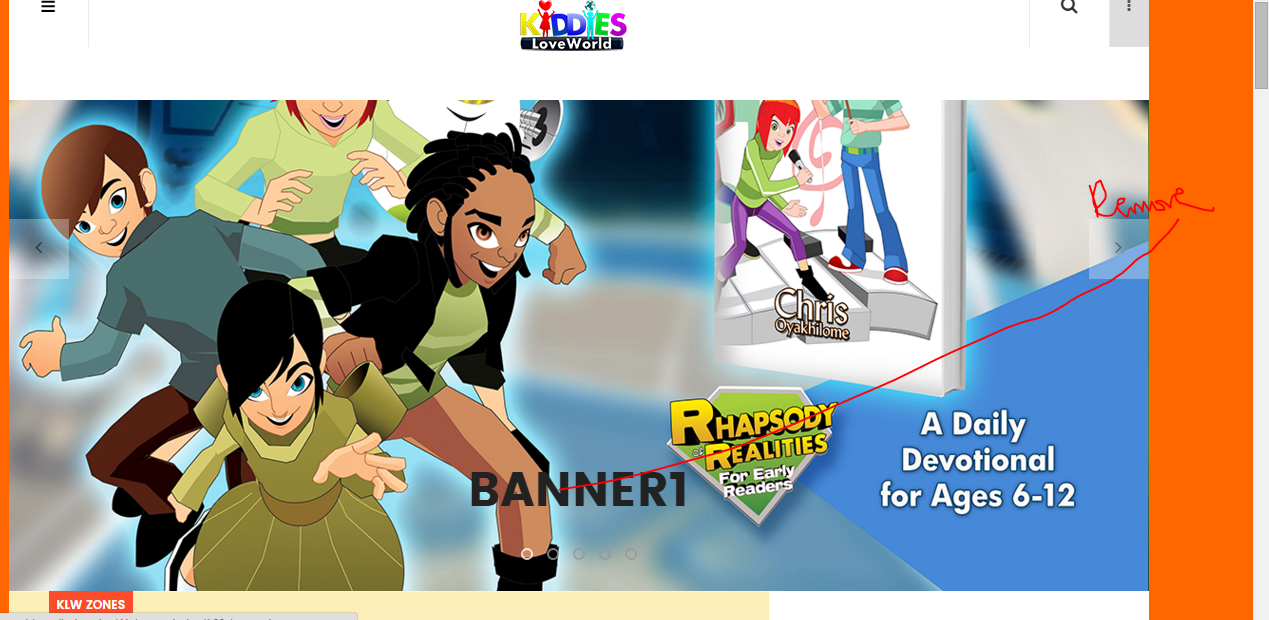
The Slideshow Banner is static, how can I make it dynamic automatically? The Banner does not have any movement, unless you click on the navigation button. How can I make the banners move automatically?D
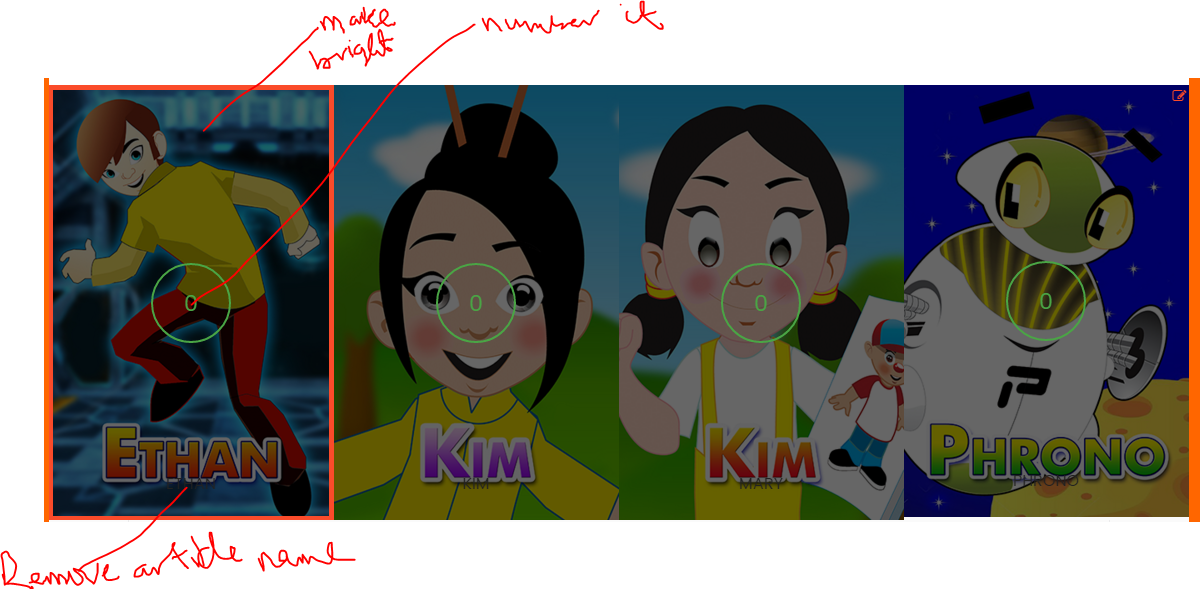
The Slideshow makes use of articles in categories, but the article name is showing on the banner, how can I remove that. See change7.png. I have updated the settings not to show the article titles, but the article titles are showing there. How can I remove them?E
Check: change7.png
I noticed that the images are not sharp, based on the template. How can I make the images sharp?
Also, the name of the article is showing on the pages. I have updated the settings not to show the article titles, but the article titles are showing there. How can I remove them?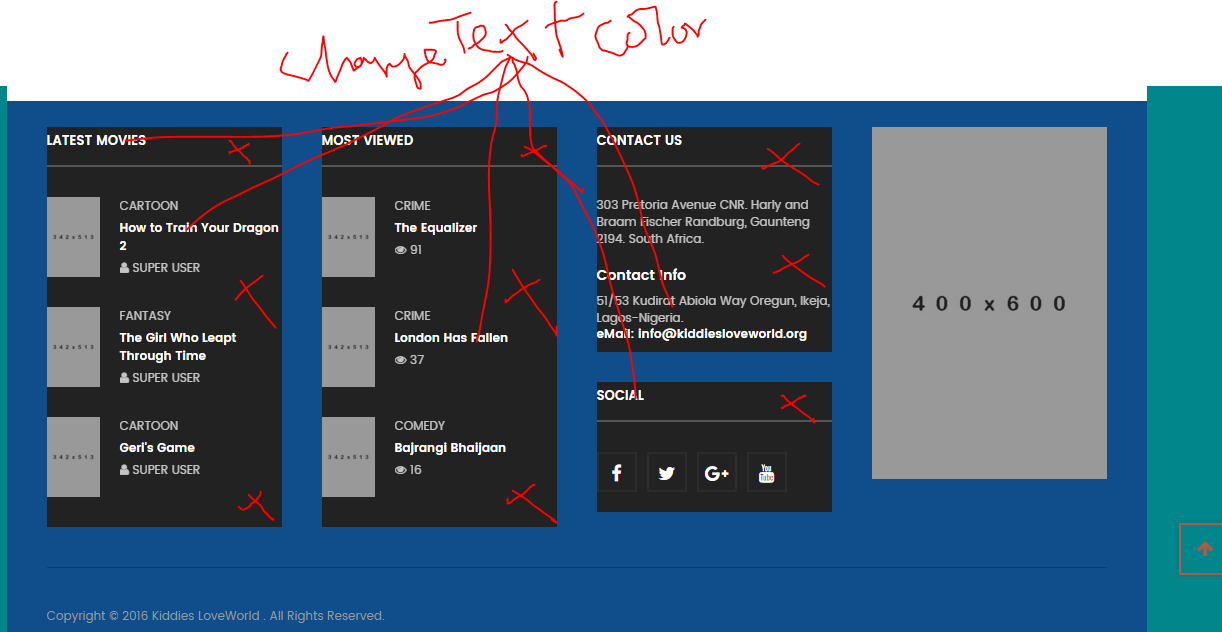
 AuthorPostsViewing 12 posts - 1 through 12 (of 12 total)
This topic contains 12 replies, has 2 voices, and was last updated by
softchris4ol 8 years, 11 months ago.
The topic ‘Change bgcolor, bgImage and position editting – JA Playstore’ is closed to new replies.
Jump to forum