

-
AuthorPosts
-
October 24, 2013 at 12:03 am #191654
How can I add caption text over the modules and article boxes on the homepage of the JA Fixel template? I know it already shows a caption when you hover over it but I would like it to be visible all the time. (Image attached for example)
Thanks
phong nam Friend
phong nam
- Join date:
- May 2015
- Posts:
- 3779
- Downloads:
- 1
- Uploads:
- 587
- Thanks:
- 499
- Thanked:
- 974 times in 888 posts
October 24, 2013 at 9:30 am #510088Hi moghees,
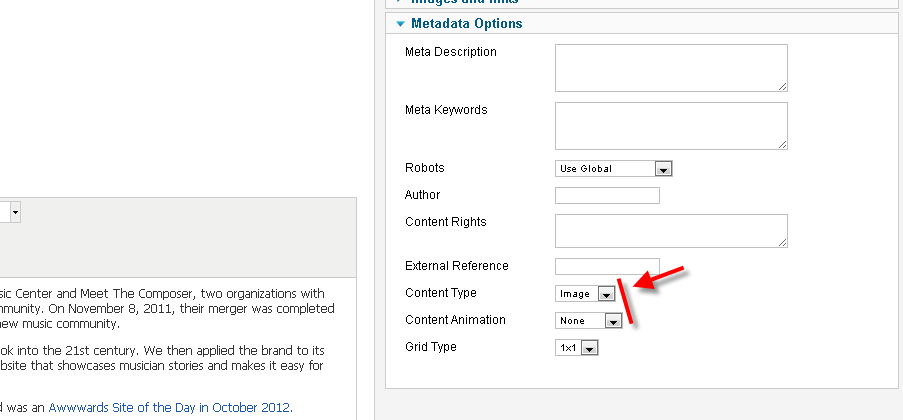
The hover caption belongs to the Images content type and None animation type articles only on JA Fixel template, and you can make that caption visible all time by creating a custom.css file at templates/ja_fixel/css/ path and putting below overridden css styles into:
/*Make the caption of Images content type visible all time*/

.fixel-grid .items.image.none article .item-desc {

opacity: 1;

-webkit-transform: translateY(0%);

-moz-transform: translateY(0%);

-ms-transform: translateY(0%);

-o-transform: translateY(0%);

transform: translateY(0%);

} October 26, 2013 at 11:50 am #510258
Thanks for that! So is there absolutely no way to have the caption over the animated boxes?
phong nam
- Join date:
- May 2015
- Posts:
- 3779
- Downloads:
- 1
- Uploads:
- 587
- Thanks:
- 499
- Thanked:
- 974 times in 888 posts
October 26, 2013 at 2:57 pm #510268Hi moghees,
As you know, the text captions you see are the article titles, not text of image caption. When you make them visible all time on another content animation (RotateX,Y), it will break the animation style of that content animation.
The idea that you should apply this modified style on Image content type with None content animation only.
AuthorPostsViewing 4 posts - 1 through 4 (of 4 total)This topic contains 4 replies, has 2 voices, and was last updated by
phong nam 11 years, 3 months ago.
We moved to new unified forum. Please post all new support queries in our New Forum
Caption over homepage boxes
Viewing 4 posts - 1 through 4 (of 4 total)

