-
AuthorPosts
-
 TomC
Moderator
TomC
Moderator
TomC
- Join date:
- October 2014
- Posts:
- 14077
- Downloads:
- 58
- Uploads:
- 137
- Thanks:
- 948
- Thanked:
- 3155 times in 2495 posts
November 17, 2009 at 10:45 pm #146131Looking through the template demo, I do not see the breadcrumb funtion.
Is it included within this template release ??:confused:
Arvind Chauhan Moderator
Arvind Chauhan
- Join date:
- September 2014
- Posts:
- 3835
- Downloads:
- 74
- Uploads:
- 92
- Thanks:
- 1240
- Thanked:
- 1334 times in 848 posts
November 18, 2009 at 9:26 am #324083Well, it should be there somewhere :p. Will have a look, you can also download the quickstart and check for yourself, by creating and publishing the breadcrumbs module.
Be assured of prompt support on this one.
Arvind
TomC
Moderator
TomC
- Join date:
- October 2014
- Posts:
- 14077
- Downloads:
- 58
- Uploads:
- 137
- Thanks:
- 948
- Thanked:
- 3155 times in 2495 posts
November 18, 2009 at 3:11 pm #324117Odd . . . It’s enabled in my back end for every page, but no breadcrumbs are displaying.
prakash Friend
prakash
- Join date:
- October 2008
- Posts:
- 439
- Downloads:
- 0
- Uploads:
- 1
- Thanks:
- 2
- Thanked:
- 146 times in 115 posts
November 19, 2009 at 2:50 am #324165hi
i installed the kaynite 1 template and enabled breadcrumbs. it definitely shows up.
The surprising part was, irrespective of whatever position name you give the breadcrumbs it still shows up!
meaning instead of breadcrumbs i just typed in thisismywebpath and it still showed up in breadcrumbs position!TomC
Moderator
TomC
- Join date:
- October 2014
- Posts:
- 14077
- Downloads:
- 58
- Uploads:
- 137
- Thanks:
- 948
- Thanked:
- 3155 times in 2495 posts
November 19, 2009 at 3:03 am #324166That’s very strange … because I just looked within Template Manager at the positions, and “breadcrumbs” is nowhere to be found.
Am I missing something ??
:confused:
prakash
- Join date:
- October 2008
- Posts:
- 439
- Downloads:
- 0
- Uploads:
- 1
- Thanks:
- 2
- Thanked:
- 146 times in 115 posts
November 19, 2009 at 3:38 am #324169Try typing the position in the module position. Actually you can type anything and just activate the module it still shows up!
TomC
Moderator
TomC
- Join date:
- October 2014
- Posts:
- 14077
- Downloads:
- 58
- Uploads:
- 137
- Thanks:
- 948
- Thanked:
- 3155 times in 2495 posts
November 19, 2009 at 2:37 pm #324269Okay, I looked within the template.css file for the css for the breadcrumbs, and this is what I found . . .
/* Breadcrumbs ---*/

#ja-breadcrums {

    background: url(../images/h3-bg.gif) no-repeat left;

    height: 30px;

    line-height: 30px;

    padding: 0 0 0 15px;

    font-size: 110%;

    color: #000;

}
#ja-breadcrums .inner {
background: url(../images/h3-bg.gif) no-repeat right;
padding: 0 10px 0 0;
margin: 0;
height: 30px;
line-height: 30px;
}#ja-breadcrums strong { margin-right: 5px; }
#ja-breadcrums img { margin: 1px 5px; }
Does it matter that breadcrumbs is mispelled? (this is how it came with the download)In which file is the layout php that calls the css for breadcrumbs ??
TomC
Moderator
TomC
- Join date:
- October 2014
- Posts:
- 14077
- Downloads:
- 58
- Uploads:
- 137
- Thanks:
- 948
- Thanked:
- 3155 times in 2495 posts
November 20, 2009 at 12:17 am #324311any thoughts, fellas ??
:((
 Anonymous
Moderator
Anonymous
Moderator
JA Developer
- Join date:
- September 2014
- Posts:
- 9914
- Downloads:
- 207
- Uploads:
- 152
- Thanks:
- 1789
- Thanked:
- 2008 times in 1700 posts
TomC
Moderator
TomC
- Join date:
- October 2014
- Posts:
- 14077
- Downloads:
- 58
- Uploads:
- 137
- Thanks:
- 948
- Thanked:
- 3155 times in 2495 posts
November 20, 2009 at 4:55 am #324337In which file is the layout php that calls the css for breadcrumbs ??
prakash
- Join date:
- October 2008
- Posts:
- 439
- Downloads:
- 0
- Uploads:
- 1
- Thanks:
- 2
- Thanked:
- 146 times in 115 posts
November 20, 2009 at 10:42 am #324394The breadcrumbs module is called in this file
templatesja_kyanitelayoutsblockstopsl.php
line 16
TomC
Moderator
TomC
- Join date:
- October 2014
- Posts:
- 14077
- Downloads:
- 58
- Uploads:
- 137
- Thanks:
- 948
- Thanked:
- 3155 times in 2495 posts
November 20, 2009 at 7:47 pm #324445Okay, correct me if I’m wrong . . . but should I not be seeing a “breadcrumb” position here ??

prakash
- Join date:
- October 2008
- Posts:
- 439
- Downloads:
- 0
- Uploads:
- 1
- Thanks:
- 2
- Thanked:
- 146 times in 115 posts
November 21, 2009 at 1:57 am #324473Yes, should should really be seeing the breadcrumbs position just below top slideshow and the user1..2..5 modules.
I suggest, you download the template package again and reinstall the template. Because its working at my end, so i think may be a file may be corrupt or something like that…
TomC
Moderator
TomC
- Join date:
- October 2014
- Posts:
- 14077
- Downloads:
- 58
- Uploads:
- 137
- Thanks:
- 948
- Thanked:
- 3155 times in 2495 posts
November 21, 2009 at 5:21 am #324488Yep, that did the trick
Anonymous
Moderator
JA Developer
- Join date:
- September 2014
- Posts:
- 9914
- Downloads:
- 207
- Uploads:
- 152
- Thanks:
- 1789
- Thanked:
- 2008 times in 1700 posts
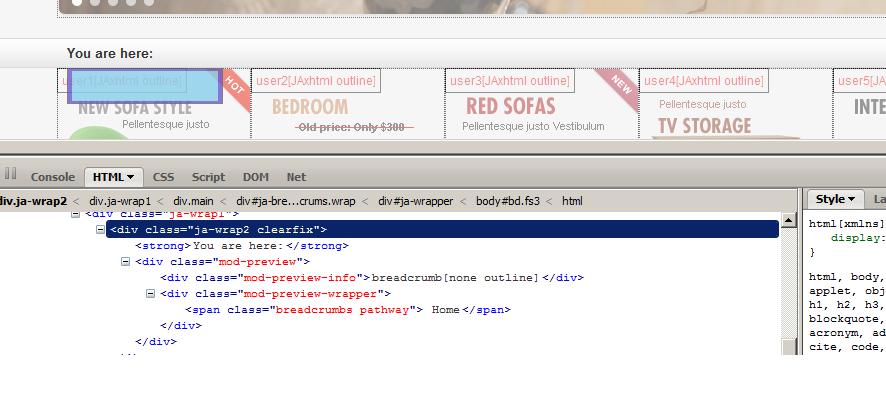
November 21, 2009 at 10:33 am #324514Hi tcraw1010
It is not the trick. When you see on the position list, this block is hidden.
Please see my attachment file. I have checked it by FireBug.
6313
It is from http://templates.joomlart.com/ja_kyanite/?tp=1
AuthorPostsThis topic contains 26 replies, has 6 voices, and was last updated by
limeweb 15 years, 2 months ago.
We moved to new unified forum. Please post all new support queries in our New Forum
melih