
Templates Club arrow Available Templates arrow JA Hadar - Your Joomla in Crystal
JA Hadar - Your Joomla in Crystal Print E-mail
Wednesday, 25 January 2006
JA Hadar Template
JA Hadar Template

JoomlArt Team is happy to announce the release of a new template called JA Hadar today.

This pure CSS, tableless design, eye catching template is not only XHTML 1.0 Transitional but also CSS validated.

JA Hadar comes with two versions for both normal screen and wide screen.
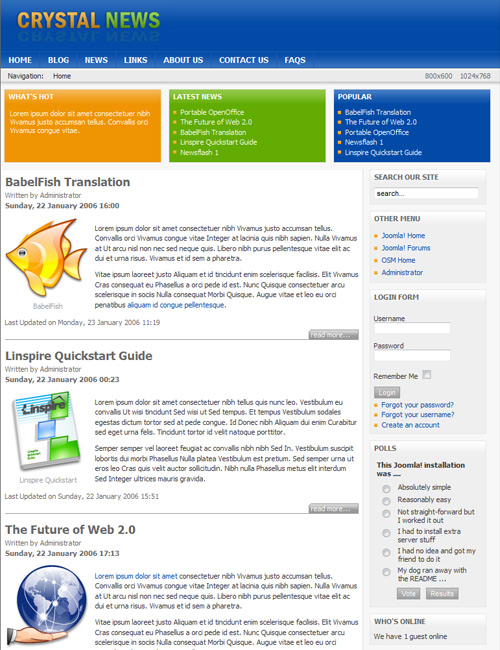
JA Hadar Features:

  • Tableless design and 100% CSS based design.
  • Joomla 1.0+ compatible, Mambo 4.5.2/4.5.3 compatible.
  • 800x600 fixed width or 1024x768 fixed width, 2 columns layout. User1, user2, user5, user6, user7 and top modules will collapse when there is no published right modules
  • XHTML 1.0 Transitional. Check it ?
  • CSS Validates. Check it ?
  • Very lightweight and fast loading.
  • Highly accessible and web standard template - Clean, community portal or news portal style website.
  • JA Hadar comes with a full user's guide (readme.txt). PSD and font files for logo are also available.
  • Work well with:
    Browsers

Live Demo:

You could view JA Hadar in live demo with two kinds of screen:

Template screenshots and explanations:

JA Hadar Quick Guide

JA Hadar Quick Guide

JA Hadar Quick Guide

JA Hadar Quick Guide

Download:

JoomlArt Templates Club members please login to the member area to download. Not a member yet? Join now!

JA Hadar Template Configurations

You can easily config JA Hadar Template Width by modifying the Template Configurations part in the "index.php".

There are three options that you can set up for this template.

Option 1: Template width is optimized for 800x600 screen resolution. No "Resolutions Option".

$width = "1";
$tool = "0";

Option 2: Template width is optimized for 800x600 screen resolution. "Resolutions Option".

$width = "1";
$tool = "1";

Option 3: Template width is optimized for 1024x768 screen resolution. No "Resolutions Option".

$width = "0";
$tool = "0";

Final notes:

  • Carefully follow installation instruction in readme.txt to get your site XHMTL and CSS validated.
  • The color of template can be easily changes via css files. Logo is editable using .PSD files.
  • If you use mosimages in your content, all attributes should be set (width, height, border) for your image caption should be set to get your site XHMTL and CSS validated.
Last Updated ( Sunday, 03 June 2007 )
 
< Prev   Next >