
Sign up JA Newsletters

We respected your privacy . We don't send ads. We send important update about Joomla and JA

Important Changes

From August 09, JA will release 1 template per month

More info

J! Templates arrow Available Templates arrow JA Altair- The art of Transmenu
  • Magento Club

    Magento Templates Club is now open. We are confident to become the best Magento Template Club on the NET!

    • The same high quality design as our Joomla templates
    • CSS3 powered, lightweight, easy to customize
    • Multi color/theme options
    • Forum & Premium email supports
    • At least one new template every month.
JA Altair- The art of Transmenu Print E-mail
Wednesday, 01 March 2006
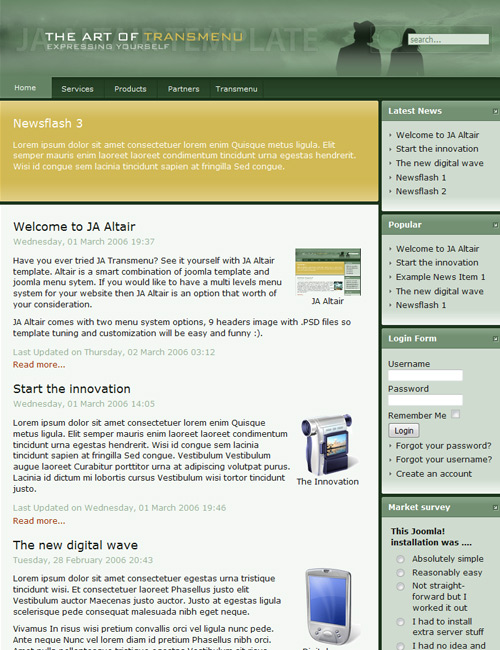
JA Altair
JA Altair Template

Have you ever tried JA Transmenu ? See it yourself with JA Altair template. JA Altair is a smart combination of joomla! template and joomla! menu system. If you would like to have a multi level menu system for your website, then JA Altair is an option worth your consideration.

JA Altair has two menu system options, 9 header images with .PSD files so template tuning and customization will be easy.
JA Altair Features:

  • Tableless design and 100% CSS based design.
  • Joomla 1.0+ and Mambo 4.5.2/4.5.3 compatible.
  • 800x600 fixed width 2 columns layout. User1, user2, left, right and top modules will collapse when there is no published right module
  • XHTML 1.0 Transitional. Check it ?
  • CSS ValidatesCheck it ?
  • Super lightweight and fast loading
  • Highly accessible and web standard template - Clean, business and cooperate style template
  • JA Altair comes with a full user's guide (readme.txt) .PSD and font files for logo are also available
  • Work well with:
    Browsers

Live Demo:

You could view JA Altair at our Templates Demo Viewer

Template screenshots and explanations:

JA Altair Overview

JA Altair Overview

9 header images

9 header images

Download:

JoomlArt Templates Club members please login to the member area to download. Not a member yet? Join now!

JA Altair Template Configurations

I. Template Configuration

You can easily config JA Altair Menu System by modifying the Template Configurations part in the "index.php".

There are two options that you can set up for this template.

  • Option 1: Using the Default Joomla! Menu System.
    $menutype= "1";
  • Option 2: Using the dynamic JA Transmenu Menu System.
    $menutype= "0";
II. Customizing Modules

You can set a "Modules Class Suffix" for a specific module by following these simple steps:

  • Step 1: Go to your Joomla Admin Center (Joomla! Administrator)
  • Step 2: Modules -> Site Modules
  • Step 3: Click on the module name you want to set a suffix (Eg. Template Chooser)
  • Step 4: Find the "Module Class Suffix" field and enter the Suffix you want.
  • Step 5: Don't forget to click Save :)
IV. Top & Bottom Menus
  • Top Menu: use "-top" as module class suffix and "header" as module position for mainmenu. Menutype is "Flat list"
  • Bottom Menu: use "-bot" as module class suffix and "bottom" as module position for mainmenu. Menutype is "Flat list"
V. Changing The Header
  • PSD file for the header is in the "includes/psd" folder of the template package.
  • Font file for the header is in the "includes/fonts" folder of the template package.

The JA Altair template comes with 9 different backgrounds for your header. To change a header background, just following these simple steps:

  • Step 1: Open the "css/template_css.css" with your CSS or text editor.
  • Step 2: Find "head-bg-2.jpg". About line 469.
  • Step 3: Change the name of the header image (head-bg-2.jpg). Eg. head-bg-5.jpg
  • Step 5: Don't forget to click Save :)
VI. Changing The Footer

Open the "footer.php" in the root folder of the template package and modify it to suite your needs.

VI. Help & Support

If you find difficulty in setting up the JA Hadar template, feel free to contact us.

Last Updated ( Sunday, 03 June 2007 )
 
< Prev   Next >